PCM vs. Dolby Digital: The Ultimate Guide to High-Fidelity and Surround Sound Audio Technologies
Digital audio has many ways of saving and playing back sound. Two of the most important are Pulse Code Modulation (PCM) and Dolby Digital. This guide looks at how PCM and Dolby Digital work, what makes them useful, and how they compare. We'll explore these technologies to understand why and how they're used in different situations.Catalog
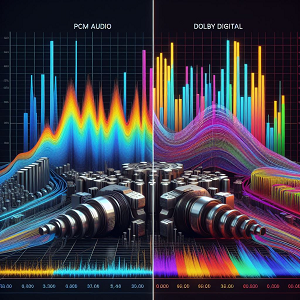
What is PCM Audio?
Pulse Code Modulation (PCM) is a widely used method for converting analog audio signals into digital form. This process involves taking regular samples of the audio signal’s amplitude at fixed intervals, which are then converted into a series of digital numbers. These numbers represent the precise values of the sound wave at each moment in time, allowing for an accurate digital representation of the original analog signal. PCM is the core of many digital audio systems, including CDs, DVDs, Blu-ray discs, and digital broadcasting formats. By converting analog audio into a digital format, PCM enables efficient storage, editing, and transmission of audio data without the degradation that analog formats often suffer over time. This makes it an ideal choice for preserving sound quality across various digital platforms.

Figure 2. Pulse Code Modulation (PCM) Audio Encoding Process
One of the primary advantages of PCM is its exceptional ability to reproduce sound with high fidelity. Since the sampling process captures the amplitude of the sound wave at very short intervals, the resulting digital audio closely mirrors the original analog waveform. This high level of accuracy helps maintain the integrity of the sound, ensuring that the digital playback is nearly indistinguishable from the original recording. Furthermore, because PCM uses uncompressed data, it avoids the loss of audio details that can occur with compressed formats like MP3. This makes it popular in audio production and high-resolution audio systems. By minimizing distortion and maintaining the richness of the original sound, PCM has become the standard choice for high-quality digital audio across multiple applications, from home entertainment systems to studio recordings.
How PCM Works?
The PCM encoding process involves two main steps: sampling and quantization.

Figure 3. Pulse Code Modulation (PCM) Process: Sampling, Quantization, and Reconstruction
Sampling: During sampling, the audio signal’s amplitude is measured at regular intervals. This interval is determined by the sampling rate, which is the number of samples taken per second. To accurately reproduce the audio, the sampling rate must be at least twice the highest frequency present in the sound, as required by the Nyquist theorem. This prevents aliasing, which can cause distortion. For example, audio CDs use a sampling rate of 44.1 kHz, capturing frequencies up to 22.05 kHz, well within the range of human hearing.
Quantization: After sampling, each measured amplitude is converted into a digital number through a process called quantization. This step assigns each sample to a specific value within a fixed range. The precision of this step depends on the bit depth, which is the number of bits used to represent each sample. Common bit depths include 16-bit for CDs and 24-bit for professional audio recordings. A higher bit depth provides a wider dynamic range and captures more detailed sound nuances. The straightforward design of PCM ensures consistent audio quality across different devices and platforms, contributing to its widespread use in digital audio formats.
PCM vs. Linear PCM
Linear Pulse Code Modulation (Linear PCM) is a specific type of PCM that uses a straightforward, linear method for quantization. This means there is a direct, proportional relationship between the amplitude of the analog signal and its digital representation. Each step in the digital scale corresponds equally to changes in the analog signal, which helps maintain sound accuracy and transparency. Standard PCM can use different quantization methods, including non-linear techniques like companding. Companding adjusts the bit allocation based on the amplitude of the signal. It gives more bits to quieter sounds to enhance detail and uses fewer bits for louder sounds, which helps conserve storage and transmission bandwidth. However, these non-linear steps can introduce slight distortions because the increments between digital values aren’t consistent.
In contrast, Linear PCM uses uniform quantization, maintaining equal steps between each digital value. This consistency preserves the shape of the sound wave more accurately and avoids the distortions associated with non-linear methods. Due to its high sound fidelity, Linear PCM is commonly used in high-quality audio applications, such as studio recordings and high-definition audio formats. It is also the standard format for CDs and DVDs. Although Linear PCM provides excellent audio quality, it requires more storage space and higher transmission bandwidth because it does not use data compression. This makes it ideal for high-fidelity applications but less suitable for situations where data efficiency is a priority. In contrast, non-linear PCM methods are often chosen for environments where saving space and bandwidth is more important than maintaining absolute sound accuracy.
What is Dolby Digital?
Dolby Digital, developed by Dolby Laboratories, is an audio encoding format designed to provide high-quality surround sound while efficiently compressing audio data. It plays a role in the entertainment industry, powering the sound in home theaters, DVDs, Blu-rays, streaming services, and broadcast television. Its main purpose is to enhance the listening experience by delivering immersive, multi-channel sound that accurately represents the spatial elements of the original recording, creating a realistic and engaging audio environment.
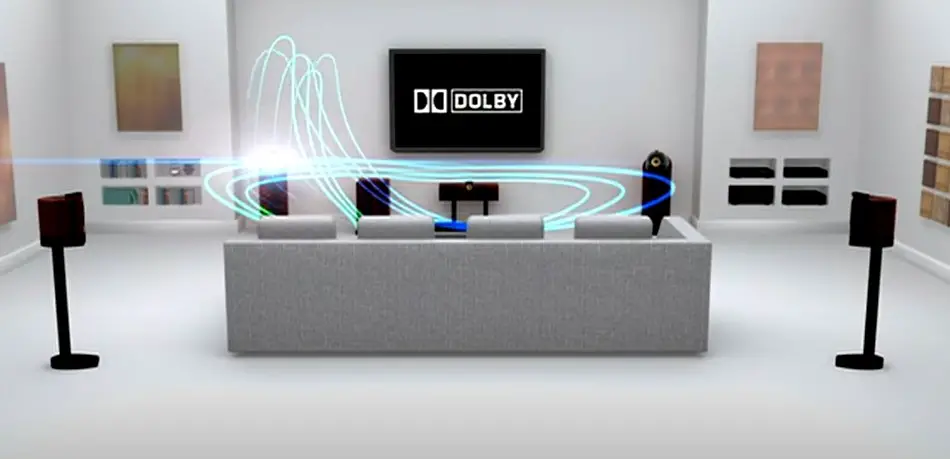
Figure 4. Dolby Digital Surround Sound Experience
How Dolby Digital Works?
Dolby Digital changed the world of audio technology by using smart digital compression techniques to deliver high-quality sound using less data. This is made possible through a method called perceptual coding. Perceptual coding identifies and removes parts of the sound that are less likely to be noticed by listeners, such as very quiet sounds that are masked by louder ones. By getting rid of these nearly inaudible details, Dolby Digital is able to reduce the amount of data needed without noticeably affecting sound quality. This allows for a more efficient storage and transmission of audio, making it possible to deliver rich, detailed sound in a smaller file size. This technology is widely used in DVDs, Blu-ray discs, and digital streaming services, allowing them to provide cinematic surround sound without needing massive amounts of storage or high-speed internet connections.
This reduction in data is best for digital formats where bandwidth and storage space are limited, like in DVDs, digital TV broadcasts, and streaming platforms. By compressing audio efficiently, Dolby Digital ensures that sound can be delivered smoothly and consistently, even over slower internet connections or in devices with limited storage capacity. Despite the smaller file sizes, Dolby Digital maintains impressive sound clarity and depth, supporting up to 5.1 channels of surround sound. This creates an immersive audio experience, making you feel as surrounded by sound from all directions. The intelligent balance of compression and quality is why Dolby Digital has become a standard in home entertainment systems, movie theaters, and online streaming services, providing audiences with powerful, high-quality audio experiences across a variety of devices and platforms.
Characteristics: PCM Audio vs. Dolby Digital
Pulse Code Modulation (PCM) and Dolby Digital are two digital audio encoding methods, each designed for specific purposes due to their unique features.
Characteristics of PCM Audio
PCM (Pulse Code Modulation) is known for its clear, uncompressed digital representation of analog sound. It accurately captures the original audio by taking regular samples of the sound wave and converting them into digital numbers. This process preserves the full detail and dynamic range of the sound, ensuring high fidelity.
• Sampling Rate and Frequency Range: PCM samples the analog signal at consistent intervals. The frequency of these samples is called the sampling rate, measured in kilohertz (kHz). The sampling rate determines the highest frequency the audio can reproduce. For example, 44.1 kHz is standard for CDs and captures frequencies up to 22.05 kHz, matching the upper limit of human hearing. 48 kHz is commonly used for DVDs and video production. 96 kHz and 192 kHz are used in high-resolution audio and recording for even more detail.
• Quantization and Bit Depth: After sampling, each sound measurement is converted into a digital number during quantization. The precision of this conversion depends on the bit depth, which is the number of bits used to represent each sample. A higher bit depth provides better resolution and dynamic range. For example, 16-bit audio, used in CDs, offers about 96 dB of dynamic range, providing clear and detailed sound for most listening environments. 24-bit audio, common in recording, extends the dynamic range to 144 dB, capturing subtle sound nuances with greater accuracy.
• Channel Configurations and Spatial Sound: PCM supports a wide range of channel setups, from mono and stereo to complex multi-channel configurations. In multi-channel PCM, each channel is processed independently, allowing precise spatial sound placement. This flexibility enhances the listening experience and makes PCM suitable for everything from music production to surround sound systems.
Characteristics of Dolby Digital
Dolby Digital, focuses on delivering multi-channel surround sound while optimizing data for storage and transmission.
• Perceptual Coding and Compression: Dolby Digital uses perceptual coding, which is based on psychoacoustic models that identify sounds. These sounds are then reduced or removed, shrinking the file size without affecting perceived audio quality. This technique is useful for digital broadcasting, streaming, and physical media like DVDs and Blu-rays, where storage space and bandwidth are limited.
• Surround Sound Configurations: Dolby Digital supports a variety of surround sound setups, enhancing the spatial depth and realism of audio. The most common configurations include, 5.1 Surround Sound with five full-range channels (Front Left, Front Center, Front Right, Surround Left, Surround Right) and one Low-Frequency Effects (LFE) channel dedicated to deep bass sounds. This setup creates a 360-degree audio experience, immersing listeners in movies, games, and music. Also, 7.1 Surround Sound expands on the 5.1 setup by adding two more surround channels (Rear Surround Left and Rear Surround Right), enhancing directional sound placement.
• Bit Rate and Audio Quality: Dolby Digital’s bit rate can be adjusted to balance sound quality and file size, depending on the application. For example, 448 kbps is common for DVDs, delivering high-fidelity surround sound. Lower bit rates are used for streaming to accommodate limited bandwidth while maintaining good audio quality. Dolby Digital’s intelligent compression algorithm prioritizes audio elements, preserving sound clarity and impact even at lower bit rates.
• Backward Compatibility and Downmixing: One of Dolby Digital’s strengths is its backward compatibility, which allows multi-channel audio to be downmixed to stereo while preserving the audio elements. This means you can enjoy Dolby Digital content on any sound system, from basic stereo speakers to full surround setups, ensuring a consistent listening experience.
• Ongoing Evolution and Advanced Formats: Dolby Digital continues to evolve with advanced technologies like Dolby Atmos and Dolby TrueHD, which enhance spatial audio with object-based sound placement and lossless audio quality. These innovations reinforce Dolby Digital’s role in setting standards for immersive audio experiences in the digital age.
Advantages: PCM Audio vs. Dolby Digital
Advantages of PCM Audio
PCM (Pulse Code Modulation) is known for its unmatched sound quality and straightforward digital representation of analog audio. It stands out in several areas:
• Uncompressed, High-Fidelity Sound: PCM captures audio exactly as it is, without any compression. This means it preserves the full dynamic range and intricate details of the original sound, ensuring high accuracy and clarity. There are no compression artifacts, such as distortion or reduced dynamic range. This makes PCM ideal for audio work, including recording, mixing, and mastering.
• High Resolution and Detail: PCM supports high sampling rates and bit depths, which allow it to capture subtle nuances in sound. For example, 16-bit/44.1 kHz is standard for CDs, while 24-bit/96 kHz or 24-bit/192 kHz is used in high-resolution audio settings. The higher the resolution, the more detailed and accurate the sound reproduction, making PCM a top choice who demand the best sound quality.
• Wide Compatibility and Integration: PCM is the basis for many digital audio formats and is widely supported across different devices and systems, including CDs, DVDs, Blu-rays, and digital audio workstations. It is compatible with audio protocols such as HDMI, SPDIF, and USB Audio, ensuring reliable playback and consistent sound quality across various platforms.
• Ideal for Audio Editing and Processing: Because PCM is uncompressed, it allows for detailed editing and post-processing without losing audio quality. This is great in environments, where precise adjustments are needed. You can manipulate the sound extensively such as applying effects, equalization, or mixing multiple tracks while maintaining the original audio’s integrity.
• Low Latency and Performance: PCM’s straightforward decoding process results in very low latency, which is need for audio applications like live performances, interactive multimedia, and gaming. It ensures accurate synchronization between audio and visual elements, making it a reliable choice for situations where timing is important.
Advantages of Dolby Digital
Dolby Digital is designed to provide high-quality, immersive sound experiences while efficiently managing data size and bandwidth. Its key strengths include:
• Efficient Compression with High Audio Quality: Dolby Digital uses perceptual audio coding to compress sound data by removing audio details that are less likely to be heard. This approach optimizes file size and bandwidth usage while maintaining clear and detailed sound. It is effective in environments with limited storage or transmission capacity, such as streaming platforms, digital broadcasts, and physical media like DVDs and Blu-rays.
• Immersive Multi-Channel Surround Sound: One of Dolby Digital’s biggest advantages is its ability to create rich, three-dimensional audio experiences. It supports various surround sound configurations, including 5.1 Surround Sound with five full-range channels (Front Left, Front Center, Front Right, Surround Left, and Surround Right) and one Low-Frequency Effects (LFE) channel for deep bass sounds. This setup creates a 360-degree audio field, feel like you are surrounded by sound, enhancing the realism and impact of movies, games, and music. 7.1 Surround Sound, adds two more rear channels (Rear Surround Left and Rear Surround Right), providing even more precise sound positioning and a more immersive experience.
• Precise Spatial Audio Placement: Dolby Digital precisely places sounds within a spatial environment, making audio seem to move naturally around the listener. This enhances the sense of presence and realism, improving the emotional engagement in movies and games. It allows to create dynamic audio landscapes.
• Flexible Bit Rates for Different Applications: Dolby Digital supports adjustable bit rates, allowing you to balance audio quality and file size based on needs such as higher bit rates (e.g., 448 kbps for DVDs) deliver high-fidelity surround sound, and lower bit rates that used for streaming services to save bandwidth while maintaining good audio quality. This flexibility ensures consistent playback across a wide range of devices and internet speeds.
• Backward Compatibility and Downmixing: Dolby Digital is designed to be compatible with both modern and older audio systems. It uses downmixing technology to convert multi-channel audio into stereo while preserving spatial cues and sound elements. This means you can enjoy Dolby Digital content on any audio setup, from stereo headphones to advanced surround sound systems.
• Widespread Adoption and Industry Standard: As a leading audio technology, Dolby Digital is supported across a vast array of devices and platforms, including home theaters, streaming services, broadcast networks, gaming consoles, and mobile devices. Its widespread use simplifies access to high-quality content and ensures consistent performance across different hardware environments.
• Continuous Innovation with Advanced Formats: Dolby Digital continues to evolve, with advanced technologies like Dolby Atmos and Dolby TrueHD enhancing spatial audio and delivering lossless sound quality. These innovations maintain Dolby’s leadership in immersive audio, influencing industry standards and setting new benchmarks for sound design.
Limitations: PCM Audio vs. Dolby Digital
Limitations of PCM Audio
PCM (Pulse Code Modulation) is highly regarded for its accurate, uncompressed digital representation of analog sound. However, its advantages come with several trade-offs:
• Large File Sizes and High Storage Requirements: PCM retains all audio details by avoiding compression, resulting in large file sizes. For example, CD-quality PCM audio recorded at 44.1 kHz with a 16-bit depth uses about 10 MB per minute per channel. This data size increases with higher sampling rates or multi-channel setups. For instance, 96 kHz/24-bit stereo consumes about 34 MB per minute, while 5.1 surround sound at the same resolution requires nearly 200 MB per minute. These large file sizes make PCM impractical for streaming or portable devices with limited storage, and they also increase costs for archiving and distributing high-resolution audio.
• High Bandwidth Requirements for Transmission: The uncompressed nature of PCM demands high bandwidth for streaming or digital transmission. Higher sampling rates and bit depths increase the data rate, requiring robust network capabilities. This can be challenging in environments with limited or unstable internet connections, such as mobile networks or rural areas. For example, streaming 96 kHz/24-bit stereo PCM audio requires approximately 4.6 Mbps, which can strain data networks.
• Lack of Error Resilience and Vulnerability to Data Loss: PCM does not include built-in error correction or advanced buffering techniques. This makes it more susceptible to data corruption during transmission, such as packet loss or interference, which can cause audible glitches, pops, or dropouts. In environments, even minor data errors can affect audio quality, requiring additional error protection systems.
• Limited Support for Advanced Surround Sound Formats: While PCM supports basic multi-channel configurations like stereo and 5.1 surround sound, it is not designed for complex spatial audio formats such as Dolby Atmos or DTS:X, which require dynamic object-based audio positioning. This limits PCM’s ability to deliver advanced surround sound experiences where precise audio placement and immersive 3D soundscapes are needed.
• Inefficient Data Storage and Distribution: The absence of compression in PCM leads to inefficient use of storage space and bandwidth. This limits its practicality for digital distribution, streaming services, or portable devices where storage efficiency and data transmission speed are important. As a result, PCM is mainly used in audio production, mastering, and archival settings where sound fidelity outweighs data efficiency.
Limitations of Dolby Digital
Dolby Digital is designed to efficiently deliver high-quality multi-channel surround sound with smaller file sizes. However, its advanced compression and encoding features also introduce several limitations:
• Lossy Compression and Reduced Audio Fidelity: To reduce file sizes, Dolby Digital uses lossy compression, selectively removing audio details that are less likely to be heard. While this approach efficiently conserves storage space, it also compromises overall audio fidelity, particularly at lower bit rates. This reduction in quality can manifest as subtle artifacts, including pre-echo, ringing, or slight distortions. The dynamic range may be diminished, making quiet sounds less distinct from louder ones, and the loss of fine details in high-frequency sounds can impact clarity and spatial accuracy. These effects are generally more noticeable or when using high-end sound systems, especially when compared to the uncompressed quality offered by formats like PCM.
• Fixed Bit Rates and Limited Resolution: Dolby Digital operates at standard bit rates, such as 448 kbps for DVDs or 640 kbps for Blu-rays. Although this is sufficient for most home theater setups, it does not support the high resolution required for audiophile-grade audio. It lacks the flexibility to handle higher sampling rates or bit depths, limiting its application in recording or high-resolution music playback.
• Restricted Channel Configurations and Spatial Audio Flexibility: Dolby Digital supports surround sound configurations up to 5.1 or 7.1 channels, but it is not natively compatible with more advanced spatial audio technologies like Dolby Atmos, which use dynamic object-based audio for precise sound placement. Although later versions like Dolby Digital Plus and Dolby TrueHD offer enhanced capabilities, they require compatible hardware and software, limiting backward compatibility.
• Dependency on Compatible Decoding Equipment: To fully experience Dolby Digital’s surround sound, playback devices must have built-in Dolby Digital decoders. Without this, the audio is downmixed to stereo, losing spatial effects and immersive qualities. This reliance on compatible equipment limits its accessibility, especially on older or budget devices that may not support advanced decoding features.
• Proprietary Format and Licensing Costs: Dolby Digital is a proprietary audio format, requiring licensing fees for encoding and decoding hardware or software. This increases production costs, potentially limiting its adoption in cost-sensitive markets or open-source projects. Additionally, strict adherence to Dolby standards is necessary for certification, impacting development flexibility and market accessibility.
Compression: PCM Audio vs. Dolby Digital
In digital audio, compression affects sound quality, file size, and how easily audio can be streamed or stored. Pulse Code Modulation (PCM) keeps audio uncompressed and lossless, preserving every detail of the original sound. On the other hand, Dolby Digital uses compression to reduce file size while keeping the sound quality as clear as possible. Knowing the difference helps you choose the best format depending on whether you need the highest sound quality or more efficient storage and streaming.
PCM Audio
PCM, or Pulse Code Modulation, is known for its lossless encoding, capturing the analog signal’s details without any compression. This method ensures high audio fidelity, making PCM the preferred choice for recording, listening, and high-resolution playback. PCM works by sampling the analog audio signal at regular intervals and converting each sample into a digital number. The accuracy of this conversion depends on two key settings: the sampling rate and the bit depth. The sampling rate is the number of times the audio is sampled per second, measured in kilohertz (kHz), and determines the maximum frequency the audio can reproduce. For example, 44.1 kHz is standard for CDs, capturing frequencies up to 22.05 kHz, which covers the range. Meanwhile, 48 kHz is commonly used in video production and DVDs, and higher rates like 96 kHz and 192 kHz are used in high-resolution audio recordings for finer detail.
Bit depth refers to the number of bits used to represent each sample, influencing the audio’s dynamic range and resolution. Higher bit depths capture more detail; for instance, 16-bit is standard for CDs, offering about 96 dB of dynamic range, while 24-bit is common in recording, providing a dynamic range of 144 dB to capture subtle sound nuances. PCM’s uncompressed format preserves the full integrity of the original sound, resulting in a pure digital representation without compression artifacts like distortion or quantization noise. This makes PCM ideal for recording and mixing, high-resolution audio playback, archival and mastering to ensure long-term preservation of original sound quality. PCM allows for maximum precision in editing and post-processing since there is no data loss. You can make adjustments such as equalization, mixing, and mastering without degrading the audio quality, making PCM the preferred format in environments requiring detailed sound manipulation.
PCM also offers low latency due to its straightforward encoding and decoding process, ensuring tight synchronization between audio and video. This is important for live performances, sound reinforcement, and interactive media and gaming, where audio output and seamless audio-visual synchronization are needed. However, PCM does have some practical limitations. Its uncompressed nature results in large file sizes, which require substantial storage space. For example, CD-quality PCM at 44.1 kHz and 16-bit stereo uses about 10 MB per minute, while 96 kHz and 24-bit stereo consume approximately 34 MB per minute. Multi-channel PCM, such as 5.1 surround sound, demands even more storage. The large data size requires high bandwidth for streaming or transmission, posing challenges in limited network conditions. This makes PCM less practical for online streaming or mobile devices with restricted data capacities.

Figure 5. PCM Audio System Architecture: Transmitter, Channel, and Receiver Sections
Dolby Digital
Dolby Digital uses lossy compression to efficiently deliver high-quality multi-channel surround sound while minimizing file size. It is widely used in home theaters, streaming platforms, and digital broadcasting, balancing audio quality with storage and transmission efficiency. Dolby Digital uses perceptual audio coding based on psychoacoustic principles. It selectively removes audio details that are less likely to be heard such as sounds masked by louder ones. This approach optimizes file size and bandwidth usage while maintaining high perceived sound quality. By intelligently prioritizing audio elements, Dolby Digital achieves efficient compression without noticeably affecting sound quality. This makes it ideal for home theaters and Blu-rays, delivering cinematic surround sound with manageable file sizes, as well as for streaming platforms and digital broadcasts, ensuring consistent playback quality over limited bandwidth networks.
Dolby Digital is known for its immersive surround sound, supporting a range of configurations, including 5.1 and 7.1 surround sound. The 5.1 setup includes five full-range channels (Front Left, Front Center, Front Right, Surround Left, Surround Right) and one Low-Frequency Effects (LFE) channel for deep bass sounds, creating a 360-degree audio that enhances immersion in movies and games. The 7.1 configuration expands on the 5.1 setup by adding two rear surround channels, providing even more precise sound placement. Compared to PCM, Dolby Digital reduces file size and bandwidth requirements through its lossy compression method. For example, a 5.1 Dolby Digital track uses 384-640 kbps, whereas an uncompressed 5.1 PCM track would require several megabits per second. This efficiency is great for streaming services, digital broadcasting, and physical media like DVDs and Blu-rays. Despite its advantages, Dolby Digital has some drawbacks. Its lossy compression method involves data reduction that removes certain audio details, which can result in artifacts such as pre-echo or slight distortions at lower bit rates, reduced dynamic range that makes quiet sounds less distinct, and a loss of fine details, which may be noticeable in high-resolution audio systems.
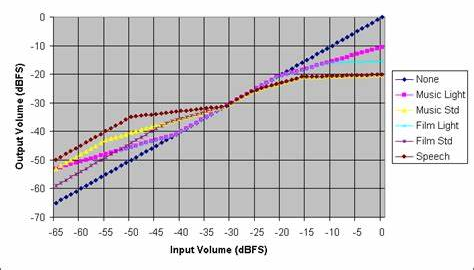
Figure 6. Dolby Digital Dynamic Range Compression Profiles
Audio Quality: PCM Audio vs. Dolby Digital
PCM Audio
PCM, or Pulse Code Modulation, delivers exceptional audio quality by accurately capturing the full dynamics and details of the original sound without any loss. It samples the analog signal at consistent intervals, converting each sample into a digital number, which preserves the audio waveform precisely and ensures transparent sound reproduction. Unlike compressed formats, PCM is uncompressed and lossless, maintaining pure, unaltered sound with no risk of compression artifacts like distortion or quantization noise. PCM is ideal for recording, high-fidelity playback systems, and archival storage because it preserves the original sound’s integrity. It also maintains precise phase and timing accuracy, which enhances spatial imaging and sound localization, creating a realistic soundstage with accurate stereo separation and depth.
The audio quality of PCM depends on two key settings: sampling rate and bit depth. Higher sampling rates, such as 96 kHz or 192 kHz, capture more detail and extend the frequency response, while higher bit depths, like 24-bit, provide greater dynamic range and finer sound resolution. This makes PCM suitable for high-resolution audio and grade sound editing and post-processing. Despite its superior sound quality, PCM requires large file sizes and high bandwidth for streaming or transmission due to its uncompressed nature. This makes it less practical for online streaming or mobile devices with limited data capacity. However, for applications where the highest audio quality is important, PCM remains the preferred choice.
Dolby Digital
Dolby Digital uses lossy compression to efficiently deliver high-quality multi-channel audio while minimizing file size and bandwidth usage. It is widely used in home theaters, streaming platforms, and digital broadcasting because it balances audio quality with data efficiency. Dolby Digital maintains audio quality through perceptual audio coding, which uses psychoacoustic principles to selectively remove audio details such as sounds masked by louder ones. By prioritizing sounds, Dolby Digital preserves important audio elements like dialogue and primary sound effects while reducing file size. Dolby Digital achieves efficient compression with high perceived quality by intelligently allocating bits to maintain audio clarity. This makes it suitable for home theaters and Blu-rays, where it delivers cinematic surround sound with smaller file sizes, as well as for streaming services and digital broadcasts, ensuring consistent playback quality over limited bandwidth networks.
Dolby Digital supports immersive multi-channel surround sound, including 5.1 and 7.1 configurations. The 5.1 setup includes five full-range channels (Front Left, Front Center, Front Right, Surround Left, Surround Right) and one Low-Frequency Effects (LFE) channel for powerful bass, creating a 360-degree that enhances immersion in movies and games. The 7.1 setup expands on 5.1 by adding two rear surround channels, providing more precise sound placement and increasing the sense of depth and spatial accuracy. Dolby Digital offers flexibility with adaptable bit rate settings to balance sound quality and file size. Higher bit rates, such as 640 kbps for Blu-rays, provide better sound quality, while lower bit rates optimize bandwidth usage for streaming while maintaining good audio clarity.
Despite its efficiency and surround sound capabilities, Dolby Digital has limitations due to its lossy compression. This can result in artifacts like spectral distortion or pre-echo, especially at lower bit rates, reduced dynamic range that makes quiet sounds less distinct, and a loss of fine details noticeable in high-end audio systems. Dolby Digital relies on compatible decoding equipment for full surround sound playback. Without compatible devices, the audio is downmixed to stereo, losing spatial effects and immersive qualities.
File Size: PCM Audio vs. Dolby Digital
File size matters in digital audio because it affects how much storage you need, how fast you can send the file, and how well it streams online. Pulse Code Modulation (PCM) and Dolby Digital manage file size in different ways.
PCM Audio
PCM (Pulse Code Modulation) preserves every detail of the original sound without any compression, ensuring highly accurate sound reproduction. It samples the analog signal at regular intervals and converts these samples into digital numbers, retaining all the original audio data. This results in pristine, lossless audio quality, making PCM ideal for high-fidelity applications. PCM files are large because they retain every bit of audio information without data reduction. High sampling rates and bit depths enhance audio resolution and dynamic range but also increase file size. For example, CD-quality PCM (44.1 kHz/16-bit stereo) uses about 10 MB per minute, while 96 kHz/24-bit stereo requires about 34 MB per minute. Multi-channel PCM, like 5.1 surround sound, consumes even more storage, making it impractical for mobile devices or streaming platforms with limited bandwidth.
PCM’s large file sizes require high bandwidth for streaming or transmission. CD-quality PCM needs about 1.4 Mbps for stereo playback, while 96 kHz/24-bit stereo requires around 4.6 Mbps. This makes PCM less suitable for online streaming or mobile networks with bandwidth limitations. Despite its storage demands, PCM is the preferred choice for applications prioritizing audio quality, such as recording, high-fidelity playback systems, and archival preservation. For more efficient storage while maintaining high sound quality, lossless compression codecs like FLAC and ALAC are good alternatives, reducing file sizes by 30-50% without losing any audio data.

Figure 7. File Size Comparison: PCM (Lossless) vs. Lossy Audio Formats
Dolby Digital
Dolby Digital uses lossy compression to efficiently reduce file sizes while maintaining high perceived audio quality. It is widely used in home theaters, digital broadcasting, and streaming platforms because it balances sound quality with storage efficiency. Dolby Digital compresses files using perceptual audio coding, which selectively removes audio details such as sounds masked by louder ones. This approach preserves important audio elements like dialogue and key sound effects while achieving data reduction.
Dolby Digital provides much smaller file sizes than PCM. For example, a 5.1 Dolby Digital track typically uses 384-640 kbps, while an uncompressed 5.1 PCM track would require several megabits per second. Dolby Digital’s flexible bit rate settings allow it to balance sound quality and file size depending on the application. For instance, 448 kbps is common for DVDs, while 640 kbps is used for Blu-rays to provide better sound quality. Lower bit rates are used for streaming to optimize bandwidth usage.
The smaller file sizes of Dolby Digital are ideal for digital broadcasting, streaming platforms, and portable devices, allowing consistent playback quality even on slower internet connections or limited storage devices. However, Dolby Digital’s lossy compression does result in some compromises in audio quality. Data reduction can cause a loss of fine details, and lower bit rates may introduce compression artifacts like spectral distortion or reduced dynamic range. Dolby Digital requires compatible decoding equipment to fully experience its surround sound effects. Without proper decoding, the audio is downmixed to stereo, losing spatial effects and immersive qualities.
Compatibility: PCM Audio vs. Dolby Digital
Compatibility is important when choosing an audio format, as it determines how easily audio can be played across different devices, platforms, and systems.
PCM Audio
PCM (Pulse Code Modulation) is known for its simple, uncompressed format, ensuring high-fidelity playback without any data loss. It samples the analog waveform at regular intervals and converts each sample into digital data, preserving the full integrity of the original sound. PCM is highly compatible because it is uncompressed and lossless, meaning it doesn’t require special decoding. It can be played on almost any digital audio device, including audio equipment, electronics like CD players and smartphones, and digital audio interfaces such as HDMI, SPDIF, and USB Audio. This universal compatibility makes PCM an audio standard across many platforms, including CDs, DVDs, Blu-rays, and digital streaming sources.
In professional settings, PCM is need for recording, mixing, and mastering because its lossless quality allows detailed editing without degrading the sound. It is also widely used in post-production, sound design, and archival preservation due to its precise audio representation. PCM supports various channel configurations, from simple stereo to complex multi-channel surround sound like 5.1 and 7.1 systems.
However, PCM has limitations due to its uncompressed nature. It generates large file sizes, requiring storage space and high bandwidth for streaming or transmission, making it less efficient for online content delivery. Although PCM supports basic surround sound, it lacks advanced spatial audio features like Dolby Atmos or DTS:X. Despite these limitations, PCM remains popular for its universal compatibility and superior sound quality.
Dolby Digital
Dolby Digital delivers high-quality multi-channel surround sound with efficient compression, making it ideal for home theaters, digital broadcasting, and streaming platforms. It uses perceptual audio coding to reduce file sizes while maintaining high perceived audio quality, supporting up to 5.1 channels of surround sound for an immersive audio experience. Dolby Digital is widely compatible with modern audio devices, including home theater systems, smart TVs, streaming devices, Blu-ray players, and gaming consoles. It is also commonly used in digital broadcasting and streaming services like Netflix, Disney+, and Amazon Prime Video, providing cinematic surround sound with manageable file sizes. Dolby Digital enhances audio with immersive multi-channel surround sound, supporting configurations like 5.1 (with five full-range channels and one LFE channel for deep bass) and 7.1 (which adds two rear surround channels for precise sound placement).
It also offers flexible bit rate settings, balancing sound quality and file size for different applications, from DVDs to high-quality Blu-ray soundtracks. However, Dolby Digital’s compatibility depends on specific decoding requirements. It requires devices with Dolby Digital decoders for full surround sound playback; otherwise, the audio is downmixed to stereo, losing spatial effects. Not all devices support Dolby Digital, especially older models, leading to inconsistent playback. Being a proprietary format, Dolby Digital involves licensing fees, which can limit its adoption in budget devices or open-source platforms. Despite its limitations, Dolby Digital is an excellent choice for delivering immersive surround sound efficiently. It is ideal for home theaters, streaming services, digital broadcasting, and gaming consoles, balancing audio quality with storage and bandwidth efficiency.

Figure 8. Dolby Digital Compatibility and Multi-Channel Audio Setup
Surround Sound Support: PCM Audio vs. Dolby Digital
Surround sound enhances audio by adding spatial depth and realism, creating an immersive listening experience for movies, video games, and multimedia.
PCM Audio
PCM (Pulse Code Modulation) delivers high-fidelity sound by preserving the full dynamic range and detail of the original audio without any compression. This makes it ideal for audio production and high-resolution playback systems. PCM handles surround sound by treating each channel as a separate, independent stream. For example, in a 5.1 surround sound setup, PCM manages six channels. This separation maintains the dynamic range and clarity of each channel, ensuring accurate spatial placement and a realistic soundstage. PCM’s detailed spatial imaging makes it ideal for recording studios, movie theaters, and high-end home theater systems.
However, PCM’s uncompressed nature leads to very large file sizes for multi-channel audio. A 5.1 surround sound track at CD quality (44.1 kHz, 16-bit) uses about 60 MB per minute. Higher resolutions, like 96 kHz/24-bit or 192 kHz/24-bit, require even more storage, exceeding 200 MB per minute for 5.1 configurations. These high data requirements demand robust storage solutions and high-bandwidth digital connections like HDMI or Optical (TOSLINK) for seamless transmission. As a result, PCM is less practical for streaming or broadcasting.
While PCM is widely supported across many devices, fully utilizing its multi-channel capabilities requires high-end hardware, including high-resolution AV receivers, sound systems capable of decoding multi-channel PCM, and audio interfaces. Without compatible equipment, PCM is often downmixed to stereo, reducing the spatial effect and overall sound quality. PCM is best suited for recording and mastering, high-end home theater systems, and archival preservation, where uncompressed audio quality and accuracy are required. Despite its high storage and bandwidth demands, PCM remains the preferred choice who prioritize fidelity over efficiency.
Dolby Digital
Dolby Digital delivers high-quality multi-channel surround sound with efficient compression, making it ideal for home theaters, digital broadcasting, and streaming platforms. It uses perceptual audio coding to compress audio data, selectively removing less noticeable audio details to balance sound quality and data efficiency. Dolby Digital supports immersive multi-channel surround sound setups, including 5.1 and 7.1 configurations. In 5.1 surround sound, there are five full-range channels enhancing impact in action scenes and music. The 7.1 configuration adds two rear surround channels for more precise sound placement and increased spatial depth. This flexibility allows for rich, enveloping soundscapes in movies, games, and multimedia.
Compared to PCM, Dolby Digital reduces file sizes, making it more suitable for digital distribution and streaming. A 5.1 Dolby Digital track uses 384-640 kbps, whereas a comparable 5.1 PCM track requires several megabits per second. This efficient compression enables high-quality surround sound on devices with limited storage or bandwidth, such as smartphones, tablets, and streaming platforms. Dolby Digital is widely supported across a broad range of devices, including home theater systems, smart TVs, streaming devices, Blu-ray players, and gaming consoles. However, it requires compatible decoding equipment for full surround sound playback. Without Dolby Digital decoding, the audio is downmixed to stereo, losing spatial effects. Dolby Digital is ideal for home theater systems and Blu-rays, streaming services and digital broadcasting, and gaming consoles, where efficient data management and immersive surround sound are priorities.
Conclusion
Looking at PCM and Dolby Digital helps us see their strengths and weaknesses in handling sound. PCM is best for projects where sound quality must be top-notch, like in music studios. It keeps every detail of the sound but creates large files that need more space and fast internet to work well. Dolby Digital, however, is great for home theaters and online streaming because it manages to keep sound quality high but with smaller file sizes, which makes it easier to use where space and speed are limited. Knowing about these systems helps you choose the right one for your needs, depending on whether sound quality or file size is more important for you. As technology improves, the way we use PCM and Dolby Digital will keep changing, influencing how we all listen to and enjoy sound.
About us
ALLELCO LIMITED
Read more
Quick inquiry
Please send an inquiry, we will respond immediately.
Frequently Asked Questions [FAQ]
1. Is PCM stereo or surround?
PCM (Pulse Code Modulation) can be both stereo and surround. It depends on how the audio is encoded and the number of channels it supports. Stereo PCM uses two channels (left and right), while surround PCM can use multiple channels (like 5.1 or 7.1) to create a surround sound experience.
2. What is a PCM on a soundbar?
On a soundbar, PCM refers to the format the soundbar uses to decode digital audio signals from external sources, like a TV or Blu-ray player. When set to PCM, the soundbar processes uncompressed audio signals, ensuring high-quality sound output that matches the original source.
3. Should I select PCM?
Select PCM if you prioritize audio quality and your setup is straightforward, mainly involving direct connections without needing to encode or compress the sound further. PCM is ideal for ensuring that the audio remains true to its original form, especially beneficial for stereo sources or if your soundbar or receiver handles multichannel audio well.
4. What is the difference between 5.1 and 7.1 PCM?
The main difference between 5.1 and 7.1 PCM is the number of audio channels. 5.1 PCM uses six channels, providing sound from the front, sides, and a subwoofer for bass. 7.1 PCM adds two extra channels at the rear, enhancing the overall sound depth and making the audio experience more immersive.
5. Does PCM support Dolby Atmos?
PCM does not inherently support Dolby Atmos. Dolby Atmos requires specific encoding that includes metadata to position sound objects in a 3D space, which PCM does not provide. For Dolby Atmos, audio must be transmitted in formats like Dolby TrueHD or Dolby Digital Plus, which can carry the necessary metadata alongside the audio data.
HDMI Modulators: Ultimate Guide to High-Definition RF Signal Distribution
on February 24th
Understanding ISPPAC-CLK5320S-01TN64C A Programmable Clock Generator
on February 21th
Popular Posts
-

Complex Instruction Set Computers: How They Changed Computing?
on April 18th 147749
-

USB-C Pinout and Features
on April 18th 111916
-

Using Xilinx Unified Simulation Primitives: A Comprehensive Guide to FPGA Design and Simulation
on April 18th 111349
-

Power Supply Voltages in Electronics: Meaning of VCC, VDD, VEE, VSS, and GND
on April 18th 83714
-

RJ45 Connector Guide: Pinout, Wiring, Cable Types, and Uses
on January 1th 79502
-

The Ultimate Guide to Wire Color Codes in Modern Electrical Systems
The way our electrical systems use colors isn’t just for looks. Each wire color now indicates a specific function, making it easier to identify and handle electrical components correctly during ins...on January 1th 66872
-

Quality (Q) Factor: Equations and Applications
The quality factor, or 'Q', is important when checking how well inductors and resonators work in electronic systems that use radio frequencies (RF). 'Q' measures how well a circuit minimizes energy...on January 1th 63005
-

Purge Valve Guide: Function, Symptoms, Testing, and Replacement for Optimal Engine Performance
The purge valve is a key part of a car’s system that helps keep the air clean by managing fuel vapors before they can escape into the atmosphere. This not only helps the environment by reducing pol...on January 1th 62949
-

Achieving Peak Performance with the Maximum Power Transfer Theorem
The Maximum Power Transfer Theorem explains how energy from a source, such as a battery or generator, flows to a connected load. It shows the exact condition where the load receives the most power....on January 1th 54077
-

A23 Battery Specifications and Compatibility
The A23 battery is a small, cylinder-shaped battery with high voltage. Also called 23A, 23AE, or MN21, it runs at 12 volts and much higher than AA or AAA batteries. Its special design make...on January 1th 52091
HOT Part Number
-

BD9B100MUV-E2
Rohm Semiconductor
IC REG BUCK ADJ 1A 16VQFN
UPD70F3539AF5A9-PN7-Q-A
Renesas Electronics America Inc
IC MICROCONTROLLER
18081A621JAT2A
KYOCERA AVX
CAP CER 620PF 100V NP0 1808
FDN340P
onsemi
MOSFET P-CH 20V 2A SUPERSOT3
70231-101
Amphenol ICC (FCI)
CONN RCPT BLADE PWR 8POS EDGE MT
MPSW42RLRAG
onsemi
TRANS NPN 300V 0.5A TO92
MC7824BT
onsemi
IC REG LINEAR 24V 1A TO220AB
AD8009ARZ-REEL
Analog Devices Inc.
IC OPAMP CFA 1 CIRCUIT 8SOIC
LT1815CS5#TRPBF
Analog Devices Inc.
IC OPAMP VFB 1 CIRCUIT TSOT23-5
DG411DYZ
Renesas Electronics America Inc
IC SWITCH SPST-NCX4 35OHM 16SOIC
VFT2060C-M3/4W
Vishay General Semiconductor - Diodes Division
DIODE SCHOTTKY 20A 60V ITO-220AB
TSX562AIYST
STMicroelectronics
IC CMOS 2 CIRCUIT 8MINISO
MR256D08BMA45
Everspin Technologies Inc.
IC RAM 256KBIT PARALLEL 48FBGA
VSC3312YYP-01
Microchip Technology
IC SWITCH 16X16 6.5GBPS 196FCBGA
XC68HC908GP20CFB
Motorola
TSG 8BIT20K FLASH
CSR8811A08-ICXR-R
Qualcomm
IC RF TXRX+MCU BLUETOOTH
MPSW05
onsemi
TRANS NPN 60V 0.5A TO92
1N4055R
Solid State Inc.
DIODE GEN PURP REV 900V 275A DO9 -

ASX342ATSC00XPED0-DP
onsemi
IMAGE SENSOR VGA 1/4 CIS SOC
0433.125NR
Littelfuse Inc.
FUSE BOARD MNT 125MA 125VAC/VDC
1SMA5941BT3G
onsemi
DIODE ZENER 47V 1.5W SMA
DCP010512BP-U/700
Texas Instruments
DC DC CONVERTER 12V 1W
1-1734344-1
TE Connectivity AMP Connectors
CONN D-SUB HD RCPT 15P R/A SLDR
KSD1621STF
onsemi
TRANS NPN 25V 2A SOT89-3
BQ24161RGET
Texas Instruments
IC BATT CHG LI-ION 1CELL 24VQFN
BTA26-600BW
STMicroelectronics
TRIAC ALTERNISTOR 600V 25A TOP3
NCP1239DD65R2G
onsemi
IC OFFLINE SWITCH FLYBACK 7SOIC
TMS320TCI6482BZTZA
Texas Instruments
TMS320 - DIGITAL SIGNAL PROCESSO
BQ20Z90DBTR-V150
Texas Instruments
IC GAS GAUGE LI-ION 30TSSOP
PCMB104T-1R0MT
Susumu
FIXED IND 1UH 18A 3.3 MOHM SMD
CY29942AXCT
Infineon Technologies
IC CLK BUFFER 1:18 200MHZ 32TQFP
CC0402KRX7R9BB561
YAGEO
CAP CER 560PF 50V X7R 0402
STPS20M60SG-TR
STMicroelectronics
DIODE SCHOTTKY 60V 20A D2PAK
AT25010N-10SC-2.7
Microchip Technology
IC EEPROM 1KBIT SPI 3MHZ 8SOIC
04023A1R0CAT4A
KYOCERA AVX
CAP CER 1PF 25V C0G/NP0 0402
ISL6327IRZ
Intersil
SWITCHING CONTROLLER, VOLTAGE-MO -

LQW18AN75NG0ZD
Murata Electronics
FIXED IND
DFA100BA160
SanRex Corporation
DIODE MODULE 1600V 100A
BAR46AFILM
STMicroelectronics
DIODE ARRAY SCHOTTKY 100V SOT23
MAX825SEUK
Analog Devices Inc./Maxim Integrated
IC SUPERVISOR MPU
MMST2222A-7-F
Diodes Incorporated
TRANS NPN 40V 0.6A SOT323
FODM8801AR2
onsemi
OPTOISO 3.75KV TRANS 4-MINI-FLAT
FJV1845FMTF
Fairchild Semiconductor
SMALL SIGNAL BIPOLAR TRANSISTOR,
EVK105RH5R1JW-F
Taiyo Yuden
CAP CER 5.1PF 16V R2H 0402
6651170-3
TE Connectivity AMP Connectors
CONN EDGE DUAL FMALE 4POS 0.508
KSZ8893FQLI-FX
Microchip Technology
IC SWITCH ETH 3PORT 128QFP
170M6340
Eaton - Bussmann Electrical Division
FUSE SQUARE 400A 1.3KVAC RECT
BCM20741A2KFB1G
Broadcom Limited
SINGLE-CHIP BLUETOOTH
MAX3443EASA+
Analog Devices Inc./Maxim Integrated
IC TRANSCEIVER HALF 1/1 8SOIC
GRM0335C1H9R3DA01D
Murata Electronics
CAP CER 9.3PF 50V C0G/NP0 0201
TNY175PN
Power Integrations
11.5 W (85-265 VAC) 15 W (230 VA
742700726
Würth Elektronik
FERRITE CORE 278 OHM SOLID 4MM
DM74S20N
onsemi
IC GATE NAND 2CH 4-INP 14DIP
P4SMA56CA-E3/61
Vishay General Semiconductor - Diodes Division
TVS DIODE 47.8VWM 77VC DO214AC