
Raspberry Pi Zero: Specs, Pinout, Projects, and Variants
This guide talks about the Raspberry Pi Zero, a small and low-cost computer made by the Raspberry Pi Foundation. Even though it’s tiny, it can do many things like running simple programs, connecting to sensors, or working as part of a smart home project. The guide explains what the Pi Zero is, what parts it has, and how to use it. It also shows the different versions of the Pi Zero, how to set it up, and what kinds of fun or useful projects you can build with it. This guide helps you understand and use the Pi Zero for your ideas.Catalog
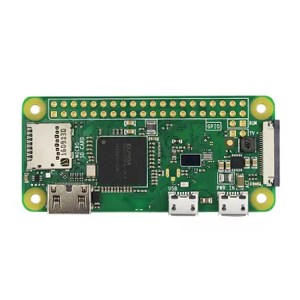
What is the Raspberry Pi Zero?
The Raspberry Pi Zero is a compact, low-cost single-board computer launched in November 2015 by the Raspberry Pi Foundation. Roughly the size of a credit card, it offers a practical solution for small-scale, energy-efficient projects, particularly in embedded systems and IoT applications. It’s useful where physical space is limited like inside wearables, portable sensors, or compact automation setups.
The Pi Zero runs on a 1GHz ARM11 single-core processor, the same Broadcom BCM2835 chip used in the original Raspberry Pi 1. Although it’s not built for heavy computing, the processor is fast enough for handling GPIO tasks, basic scripting, lightweight graphical interfaces, and sensor data processing. It includes 512MB of LPDDR2 SDRAM, which is enough for running simple applications, Python scripts, or even hosting background services. Because this memory is volatile, data is lost when power is turned off. For storage, the board relies on a microSD card, which holds the operating system and files.
Raspberry Pi Zero Technical Specifications
|
Specifications |
Details |
|
Processor |
Broadcom BCM2835, 1GHz ARM1176JZF-S (Single-core) |
|
Floating Point Unit |
VFP (Vector Floating Point) for math and signal
processing tasks |
|
RAM |
512MB LPDDR2 SDRAM (soldered on board) |
|
Storage |
microSD card slot (OS and data stored externally) |
|
Power Supply |
5V via micro USB |
|
Power Consumption |
Typically under 120mA (depends on peripherals) |
|
USB Ports |
1 × micro USB for power |
|
1 × micro USB OTG for peripherals |
|
|
Video Output |
Mini HDMI port (supports up to 1080p HD output) |
|
Camera Support |
CSI camera connector (available from version 1.3 onwards) |
|
GPIO Header |
40-pin unpopulated GPIO header |
|
Other I/O Options |
Analog composite video output pads |
|
Reset header |
|
|
Operating System |
Raspberry Pi OS Lite or other embedded Linux distributions |
|
Dimensions |
66mm × 30.5mm × 5mm |
|
Weight |
Less than 10 grams |
Raspberry Pi Zero Pin Configuration

Figure 2. Raspberry Pi Zero Pinout
| Pin | Pin Name | Function |
| 1 | 3.3V | Supplies 3.3V power for low-voltage sensors and modules. |
| 2 | 5V | Provides 5V directly from the power supply; used for powering higher-voltage devices. |
| 3 | GPIO 2 (SDA1) | I²C data line for communication with I²C devices like RTC modules or sensors. |
| 4 | 5V | Same as Pin 2, used for powering modules requiring 5V. |
| 5 | GPIO 3 (SCL1) | I²C clock line, works with SDA for synchronized data transfer. |
| 6 | GND | Common electrical ground for circuits. |
| 7 | GPIO 4 (GPCLK0) | General-purpose I/O or General Purpose Clock 0; often used for sensors or relays. |
| 8 | GPIO 14 (TXD) | UART transmit line; sends serial data to devices like GPS or Arduino. |
| 9 | GND | Ground connection. |
| 10 | GPIO 15 (RXD) | UART receive line; receives serial data. |
| 11 | GPIO 17 | GPIO pin usable for custom input/output or PWM. |
| 12 | GPIO 18 (PCM_CLK) | Pulse-code modulation clock or general GPIO; supports hardware PWM. |
| 13 | GPIO 27 | Another general-purpose input/output pin. |
| 14 | GND | Ground connection. |
| 15 | GPIO 22 | Multi-purpose GPIO pin. |
| 16 | GPIO 23 | Usable for digital I/O, often seen in automation projects. |
| 17 | 3.3V | Alternate 3.3V output pin. |
| 18 | GPIO 24 | General-purpose input/output. |
| 19 | GPIO 10 (MOSI) | SPI Master Out Slave In; used to send data to SPI devices like OLED displays. |
| 20 | GND | Ground connection. |
| 21 | GPIO 9 (MISO) | SPI Master In Slave Out; receives data from SPI devices. |
| 22 | GPIO 25 | Multi-use GPIO pin. |
| 23 | GPIO 11 (SCLK) | SPI clock line; coordinates data timing for SPI devices. |
| 24 | GPIO 8 (CE0) | SPI Chip Enable 0; selects SPI device 0. |
| 25 | GND | Ground connection. |
| 26 | GPIO 7 (CE1) | SPI Chip Enable 1; selects SPI device 1. |
| 27 | GPIO 0 (ID_SD) | EEPROM data line for HAT auto-detection. |
| 28 | GPIO 1 (ID_SC) | EEPROM clock line for HAT auto-detection. |
| 29 | GPIO 5 | General-purpose input/output. |
| 30 | GND | Ground connection. |
| 31 | GPIO 6 | Multi-use GPIO pin. |
| 32 | GPIO 12 (PWM0) | Supports hardware Pulse Width Modulation (PWM) – used in motor speed control. |
| 33 | GPIO 13 (PWM1) | Second hardware PWM output. |
| 34 | GND | Ground connection. |
| 35 | GPIO 19 (PCM_FS) | PCM Frame Sync line; used for audio data sync or GPIO. |
| 36 | GPIO 16 | General GPIO pin. |
| 37 | GPIO 26 | Flexible GPIO pin. |
| 38 | GPIO 20 (PCM_DIN) | PCM digital audio input. |
| 39 | GND | Ground connection. |
| 40 | GPIO 21 (PCM_DOUT) | PCM digital audio output. |
Raspberry Pi Zero Variants
Several versions of the Pi Zero have been released to serve different user needs.
Pi Zero (2015)
The original Raspberry Pi Zero debuted in 2015 as an ultra-low-cost, compact single-board computer. It features a 1GHz single-core ARM11 processor and 512MB of RAM, making it suitable for basic computing tasks and simple embedded applications. The board includes a mini HDMI port for video output, micro USB ports (one for power and one for data via OTG), and an unpopulated 40-pin GPIO header, giving flexibility in hardware customization. However, it lacks any built-in networking capabilities, which limits its standalone connectivity unless paired with external modules.

Figure 3. Raspberry Pi Zero (Original)
Pi Zero W (2017)
The Pi Zero W builds upon the original by integrating wireless connectivity, including 802.11n Wi-Fi and Bluetooth 4.1. This addition dramatically expands the board's potential in wireless projects such as Internet of Things (IoT) devices, portable network sensors, or remote-controlled systems. Aside from the wireless features, its hardware specifications remain identical to the original Pi Zero, still using the single-core 1GHz processor and 512MB of RAM.

Figure 4. Pi Zero W
Pi Zero WH (2018)
Functionally the same as the Pi Zero W, the Pi Zero WH distinguishes itself by including pre-soldered 40-pin GPIO headers. This small change lowers the barrier who may not have access to soldering equipment. It’s useful in educational settings or for rapid prototyping, allowing to plug the board directly into a breadboard or connect accessories without additional preparation.

Figure 5. Pi Zero WH
Pi Zero 2 W (2021)
Representing a substantial leap forward, the Pi Zero 2 W introduces a quad-core 64-bit ARM Cortex-A53 processor (Broadcom BCM2710A1), the same architecture used in the Raspberry Pi 3. Despite maintaining the same compact form factor and 512MB of LPDDR2 RAM, the performance boost enables it to handle more demanding applications, such as light web browsing, multitasking, or video processing. It retains wireless connectivity (Wi-Fi and Bluetooth), making it a powerful choice for more complex embedded systems and portable computing projects.

Figure 6. Pi Zero 2 W
The table below outlines their key differences and similarities to help you choose the best fit for your project.
|
Feature |
Raspberry Pi Zero |
Raspberry Pi Zero W |
Raspberry Pi Zero 2 W |
|
Processor |
Broadcom BCM2835 SoC (ARM11) |
Broadcom BCM2835 SoC (ARM11) |
Broadcom BCM2710A1 SoC (Quad-core ARM Cortex-A53) |
|
CPU Clock Speed |
1 GHz |
1 GHz |
1 GHz (Quad-core) |
|
GPU |
Broadcom VideoCore IV |
Broadcom VideoCore IV |
Broadcom VideoCore IV |
|
RAM |
512 MB LPDDR2 SDRAM |
512 MB LPDDR2 SDRAM |
512 MB LPDDR2 SDRAM |
|
Storage |
MicroSD Card Slot |
MicroSD Card Slot |
MicroSD Card Slot |
|
USB Ports |
1x Micro USB (OTG), 1x Micro USB (Power) |
1x Micro USB (OTG), 1x Micro USB (Power) |
1x Micro USB (OTG), 1x Micro USB (Power) |
|
HDMI Output |
1x Mini HDMI |
1x Mini HDMI |
1x Mini HDMI |
|
Audio Output |
Via GPIO or HDMI |
Via GPIO or HDMI |
Via GPIO or HDMI |
|
Wi-Fi |
No |
802.11n Wi-Fi |
802.11n Wi-Fi |
|
Bluetooth |
No |
Bluetooth 4.1 BLE |
Bluetooth 4.1 BLE |
|
GPIO Pins |
40-pin unpopulated header |
40-pin unpopulated header |
40-pin unpopulated header |
|
Power Supply |
5V via Micro USB |
5V via Micro USB |
5V via Micro USB |
|
Power Consumption |
0.5W (Idle) to 1.5W (Load) |
0.5W (Idle) to 1.5W (Load) |
0.5W (Idle) to 1.5W (Load) |
|
Composite Video Output |
Yes (via solder pads) |
Yes (via solder pads) |
Yes (via solder pads) |
|
Camera Interface (CSI) |
No |
Yes |
Yes |
|
Video Output |
1080p via HDMI |
1080p via HDMI |
1080p via HDMI |
|
Dimensions |
65mm x 30mm x 5mm |
65mm x 30mm x 5mm |
65mm x 30mm x 5mm |
|
Weight |
Approximately 9g |
Approximately 9g |
Approximately 9g |
|
Ethernet |
No |
No |
No |
|
Camera Port (CSI) |
No |
Yes |
Yes |
Using the Raspberry Pi Zero
Setting up the Raspberry Pi Zero is simple and doesn’t require advanced skills.
1. Prepare the Software: To begin using the Raspberry Pi Zero, you first need to download the Raspberry Pi OS from the official Raspberry Pi website. After that, use a program like Raspberry Pi Imager or balenaEtcher to write the OS image onto a microSD card, ideally a Class 10 card for better performance. Once the image is written, safely eject the card and insert it into the microSD slot on the Raspberry Pi Zero.
2. Set Up the Hardware: Next, connect the necessary peripherals to the Pi Zero. Use a mini HDMI cable to hook up the Pi to a monitor so you can see the interface. Since the Pi Zero has only one micro USB port for data, you’ll need a USB OTG adapter to connect a keyboard and mouse. If you want to connect more devices, you can use a powered USB hub. Finally, plug in a 5V power supply that provides at least 1.2 amps; this is important to prevent under-voltage issues that could cause instability.
3. Boot Up and Interface: Once powered, the Raspberry Pi Zero will automatically boot into the operating system. Depending on how you set it up, it may show a desktop interface or just a command-line terminal. If you prefer not to use a monitor and keyboard every time, you can enable remote access through SSH (for command-line control) or VNC (for graphical desktop access), which allows you to control the Pi from another computer.
4. Use GPIO Pins (for Hardware Projects): If you want to connect electronics or sensors, you can use the GPIO (General Purpose Input/Output) pins on the Pi Zero. To work with these pins in Python, install a library such as RPi.GPIO or gpiozero. Always double-check the pin diagram before making any connections, as incorrect wiring can damage your board. Handle the Pi gently when connecting components, as the board is small and delicate.
5. Performance and Cooling: While the Pi Zero is quite efficient, it can still heat up if you're running demanding tasks. To keep it cool, consider adding a small heat sink or ensuring there is good airflow around the board. This helps maintain performance and can extend the life of your device, especially during long or intensive use.
6. Versatile Usage: The Raspberry Pi Zero runs a full Linux system, which means it’s capable of much more than just basic projects. You can install a wide range of software, run small servers, program in multiple languages, or even deploy containerized applications. This makes the Pi Zero useful not only as an educational tool but also for practical, and applications like home automation, IoT devices, or network tools.
Raspberry Pi Zero Applications
Handheld Retro Gaming Console
The Raspberry Pi Zero is a popular choice for building compact, handheld emulation consoles with software like RetroPie. Thanks to its small size and efficiency, it fits into 3D-printed enclosures or recycled gaming shells. Paired with mini LCDs and USB or custom controllers, it can play classic games from consoles such as the NES, SNES, and Game Boy, perfect for portable arcade fun.
Kodi Media Player
Installed with Kodi and a lightweight Linux OS, the Pi Zero can function as a low-cost media center. It plays SD videos well and supports streaming via Kodi add-ons. When connected to a mini HDMI display and remote, it’s a great option for travel-friendly entertainment or a child’s media box.
Network-Wide Ad Blocker (Pi-hole)
Pi-hole transforms the Pi Zero into a DNS-based ad blocker for an entire network. It’s easy to set up and runs efficiently on the Zero’s modest hardware, improving browsing speeds and conserving data, especially useful on metered or mobile connections.
Ambient or Sunrise Light Controller
The Pi Zero can power LED strips via GPIO and PWM to simulate sunrise or shift lighting based on time or mood. It can sync with alarms or environment data, offering a minimalist home automation project for mood or wake-up lighting.
Time-Lapse Photography Rig
By connecting a camera module, the Pi Zero can be programmed to take photos at intervals and compile them into time-lapse videos. It’s suited for documenting events like plant growth, building projects, or sky changes, and its lightweight form factor makes it easy to mount.
CubeSat Controller
Despite not being radiation-hardened, the Pi Zero has been successfully used in CubeSats for short-term space missions. Its light weight and low power usage make it suitable for telemetry, data logging, or basic onboard tasks in low Earth orbit.
RFID-Tracked Bird Feeder
When paired with an RFID reader, the Pi Zero can track tagged birds or small wildlife at feeders. It logs visit times and frequencies, and can trigger cameras or sounds, supporting wildlife studies or personal observation projects.
Voice Assistant Device
The Pi Zero can serve as a basic smart speaker running voice assistants like Mycroft or the Google Assistant SDK. With added microphones and speakers, it performs common voice tasks like setting timers, checking the weather, or playing music, an open-source take on commercial smart speakers.
Conclusion
The Raspberry Pi Zero combines affordability, versatility, and compact design to serve as a powerful platform for small-scale embedded projects. With straightforward setup instructions and support for a wide range of applications like media streaming, ad blocking, voice assistance, and time-lapse photography, the Pi Zero proves its value far beyond its size and price. Whether you're building a retro game console, a smart light controller, or a space-bound CubeSat experiment, the Raspberry Pi Zero offers the right blend of power and simplicity for inventive, low-power solutions.
About us
ALLELCO LIMITED
Read more
Quick inquiry
Please send an inquiry, we will respond immediately.
Frequently Asked Questions [FAQ]
1. How many GPIO pins are in Raspberry Pi Zero?
The Raspberry Pi Zero has 40 GPIO (General Purpose Input/Output) pins. These pins are arranged in a 2x20 header format and allow the board to connect to sensors, buttons, LEDs, motors, and other electronics. While the header may not be pre-soldered on some versions (like the original Pi Zero), the pin layout matches the standard 40-pin configuration found on other modern Raspberry Pi boards. Not all pins are used for general input/output; some are for power (like 3.3V, 5V, and ground), while others are reserved for specific functions like I²C, SPI, UART, and PWM.
2. Do all Raspberry Pis have the same pinout?
No, not all Raspberry Pi models have the exact same pinout, but most modern models, including Raspberry Pi Zero, Zero W, and Raspberry Pi 2/3/4, use the standard 40-pin GPIO layout. Older versions like the original Raspberry Pi Model A and B (rev 1) only had 26 GPIO pins, with a different layout. So, if you're using newer models, accessories and code are usually compatible, but with older boards, you’ll need to double-check the pin mapping before connecting hardware or writing code.
3. What is the digital output of Raspberry Pi Zero?
The Raspberry Pi Zero can send digital output signals of 3.3 volts through its GPIO pins. This means when a pin is set to “HIGH” in code, it outputs 3.3V, and when set to “LOW,” it outputs 0V. It cannot output 5V logic directly, so connecting it to devices that expect 5V digital signals requires a level shifter to avoid damage or communication errors. The GPIO pins can be controlled using Python or other programming languages with libraries like RPi.GPIO or gpiozero.
4. Is Pi Zero 32 or 64-bit?
The original Pi Zero, Pi Zero W, and Pi Zero WH are 32-bit devices, using a single-core ARM11 CPU (Broadcom BCM2835). However, the Pi Zero 2 W is 64-bit, thanks to its quad-core ARM Cortex-A53 processor (Broadcom BCM2710A1). So, if you're using one of the newer Pi Zero 2 models, you can run 64-bit operating systems, while the older models are limited to 32-bit only. This affects the kind of software you can install and how much memory certain applications can use.
5. What is GPIOzero?
GPIOzero is a Python library designed to make it easier to control the GPIO pins on Raspberry Pi boards. It lets you write simple code to control LEDs, buttons, sensors, motors, and other devices without needing to deal with low-level pin settings. For example, instead of writing long setup code, you can just use commands like LED(17).on() to turn on an LED connected to pin 17. It’s beginner-friendly and perfect for quick prototyping or classroom learning.
EP20K100EQC240-2X Intel FPGA: Features, Programming, Applications, and Datasheet Guide
on May 8th
AD9850BRSZ for Wireless and RF Projects
on May 7th
Popular Posts
-

Complex Instruction Set Computers: How They Changed Computing?
on June 11th 148369
-

USB-C Pinout and Features
on June 11th 131089
-

Using Xilinx Unified Simulation Primitives: A Comprehensive Guide to FPGA Design and Simulation
on June 11th 111849
-

Power Supply Voltages in Electronics: Meaning of VCC, VDD, VEE, VSS, and GND
on June 11th 94098
-

RJ45 Connector Guide: Pinout, Wiring, Cable Types, and Uses
on January 1th 93471
-

The Ultimate Guide to Wire Color Codes in Modern Electrical Systems
The way our electrical systems use colors isn’t just for looks. Each wire color now indicates a specific function, making it easier to identify and handle electrical components correctly during ins...on January 1th 76627
-

Quality (Q) Factor: Equations and Applications
The quality factor, or 'Q', is important when checking how well inductors and resonators work in electronic systems that use radio frequencies (RF). 'Q' measures how well a circuit minimizes energy...on January 1th 74625
-

Purge Valve Guide: Function, Symptoms, Testing, and Replacement for Optimal Engine Performance
The purge valve is a key part of a car’s system that helps keep the air clean by managing fuel vapors before they can escape into the atmosphere. This not only helps the environment by reducing pol...on January 1th 68562
-

Understanding Capacitors and Their Symbols in Circuit Diagrams
Capacitors are small parts used in almost all electronic devices. They store and release electrical energy and are found in things like power supplies, radios, and circuits that help reduce noise. ...on June 11th 58353
-

A23 Battery Specifications and Compatibility
The A23 battery is a small, cylinder-shaped battery with high voltage. Also called 23A, 23AE, or MN21, it runs at 12 volts and much higher than AA or AAA batteries. Its special design make...on January 1th 57907
HOT Part Number
-

MGA-634P8-TR1G
Broadcom Limited
IC AMP CDMA 1.5GHZ-2.3GHZ 8QFN
AD8276BRMZ-R7
Analog Devices Inc.
IC OPAMP DIFF 1 CIRCUIT 8MSOP
RK73H2BTTD4420F
KOA Speer Electronics, Inc.
RES 442 OHM 1% 1/4W 1206
12105G106ZAT2A
KYOCERA AVX
CAP CER 10UF 50V Y5V 1210
8SLVP1204ANLGI/W
Renesas Electronics America Inc
IC CLK BUFFER 2:4 2GHZ 16VFQFN
VI-J11-EX
Vicor Corporation
DC DC CONVERTER 12V 75W
MM74C04M
onsemi
IC INVERTER 6CH 1-INP 14SOIC
THVD1420DR
Texas Instruments
3.3-V TO 5-V RS-485 TRANSCEIVER
MPXY8600DK6T1
NXP USA Inc.
RF TX IC FSK 315/434MHZ 32QFN
LTC2402IMS#PBF
Analog Devices Inc.
IC ADC 24BIT SIGMA-DELTA 10MSOP
HCPL-314J-500E
Broadcom Limited
OPTOISO 5KV 2CH GATE DRIVER 16SO
MIC5504-3.3YM5-T5
Microchip Technology
IC REG LINEAR 3.3V 300MA SOT23-5
XC4013XL-2BG256C
AMD
IC FPGA 192 I/O 256BGA
71M6534H-IGT/F
Analog Devices Inc./Maxim Integrated
IC ENERY METER 3PH 256K 120-LQFP
IRFS52N15DTRLP
Infineon Technologies
MOSFET N-CH 150V 51A D2PAK
0805ZC104KAT9A
KYOCERA AVX
CAP CER 0.1UF 10V X7R 0805
SIS444DN-T1-GE3
Vishay Siliconix
MOSFET N-CH 30V 35A PPAK1212-8
87972DYI-147LFT
Renesas Electronics America Inc
IC CLOCK MULTIPLIER 52TQFP -

2N6351
Microchip Technology
TRANS NPN DARL 150V 5A TO33
LCMXO256C-4M100C
Lattice Semiconductor Corporation
IC FPGA 78 I/O 100CSBGA
301A10059X
Conec
CONN D-SUB PLUG 25POS SLDR CUP
IPA60R520CP
Infineon Technologies
N-CHANNEL POWER MOSFET
WM8510GEDS/RV
Cirrus Logic Inc.
IC CODEC MONO SPEAKER DVR 28SSOP
0805CS-240EJTS
Delta Electronics/Components
FIXED IND 24NH 500MA 220MOHM SMD
SML-D12V8WT86
Rohm Semiconductor
LED RED DIFFUSED 0603 SMD
MM3Z13VST1G
onsemi
DIODE ZENER 13V 300MW SOD323
FAN53600AUC33X
onsemi
IC REG BUCK 3.3V 600MA 6WLCSP
AD8602ARZ-REEL7
Analog Devices Inc.
IC CMOS 2 CIRCUIT 8SOIC
EP3C40F484C6N
Intel
IC FPGA 331 I/O 484FBGA
S-8352A33MC-K2ST2G
ABLIC Inc.
IC REG CTRLR BOOST SOT23-5
S30460
Microchip Technology
RECTIFIER
NB100LVEP56DTR2G
onsemi
IC DIFF DIG MULTPL 2X2:1 20TSSOP
SI9114ADY-T1-E3
Vishay Siliconix
IC REG CTRLR MULT TOP 14SOIC
SI4896DY-T1-E3
Vishay Siliconix
MOSFET N-CH 80V 6.7A 8SO
FOD250L
onsemi
OPTOISO 5KV TRANS W/BASE 8DIP
BD4836G-TR
Rohm Semiconductor
IC SUPERVISOR 1 CHANNEL 5SSOP -
KSZ8721BL
Microchip Technology
IC TRANSCEIVER FULL 1/1 48LQFP
RT9011-MSGJ6
Richtek USA Inc.
IC REG LINEAR 2.8V/3.3V TSOT23-6
SN65HVD485ED
Texas Instruments
IC TRANSCEIVER HALF 1/1 8SOIC
VI-2N4-CU
Vicor Corporation
DC DC CONVERTER 48V 200W
UC2844AD
Texas Instruments
IC CUR-MODE PWM CONT 14-SOIC
STM32F072C8T7
STMicroelectronics
IC MCU 32BIT 64KB FLASH 48LQFP
1206L035/16YR
Littelfuse Inc.
PTC RESET FUSE 16V 350MA 1206
AD8553ARMZ-REEL
Analog Devices Inc.
IC INST AMP 1 CIRCUIT 10MSOP
MSP430F5310IRGCR
Texas Instruments
IC MCU 16BIT 32KB FLASH 64VQFN
SMAJ12A-E3/5A
Vishay General Semiconductor - Diodes Division
TVS DIODE 12VWM 19.9VC DO214AC
MOC3032VM
Fairchild Semiconductor
TRIAC OUTPUT OPTOCOUPLER WITH ZE
MT47H64M16HR-187E:H
Micron Technology Inc.
IC DRAM 1GBIT PAR 84FBGA
CY22393FXIT
Infineon Technologies
IC CLOCK GENERATOR 16TSSOP
MBR2535CT
Vishay General Semiconductor - Diodes Division
DIODE ARRAY SCHOTTKY 35V TO220AB
06035A101JA12A
KYOCERA AVX
CAP CER 100PF 50V C0G/NP0 0603
LM431ACMX
onsemi
IC VREF SHUNT ADJ 2% 8SOIC
HMC175MS8TR
Analog Devices Inc.
IC DOUBLER PASSIVE FREQ 8MSOP
TL072CDG4
Texas Instruments
IC OPAMP JFET 2 CIRCUIT 8SOIC