
Introduction to ROM Memory
Read-Only Memory, or ROM, is a type of computer memory that stores data permanently, even when the power is off. In this article, you will learn what ROM is, how it works, its different types, and how it compares to RAM. You will also see its uses in devices, its pros and cons, and why it is an important part of modern electronics.Catalog

Figure 1. Read-Only Memory (ROM) Chip
What is Read-Only Memory (ROM)?
Read-Only Memory (ROM) is a type of non-volatile storage that keeps data permanently, even when the power supply is turned off. This distinguishes it from Random Access Memory (RAM), which loses all stored information once the system shuts down.
The primary role of ROM is to hold essential programs and instructions that a computer or device needs to start up, run, and manage its basic operations. These instructions, often referred to as firmware, are critical because they ensure that the system can boot and function consistently each time it is powered on.
Once data is written onto a ROM chip, it generally cannot be changed or erased under normal conditions. This fixed and stable nature makes it secure and dependable, which is why ROM is widely used to store firmware, embedded programs, and device-specific instructions that must remain intact.
How ROM Works

Figure 2. ROM Boot Process
ROM operates through a carefully arranged structure of memory cells, organized in a grid of rows and columns. Each intersection point in this grid corresponds to a specific memory element that can represent a binary value. Accessing data begins with an address signal sent to a decoder, which identifies the exact row and column of the desired memory location.
Once the address is decoded, logic gates, commonly OR gates, combine the signals to produce a clear output that represents the stored bit. This system allows the processor to retrieve instructions in a predictable and precise manner, ensuring that the correct data is always delivered when requested.
During startup, the ROM becomes active immediately as the system powers on. The stored data is not altered but simply read out, following the fixed patterns embedded in the chip. A small, stable power supply keeps the circuit operational, allowing the instructions to be delivered consistently each time. This ensures that the same set of commands is always available, forming the foundation for reliable system operation.
Types of ROM
Mask ROM (MROM)
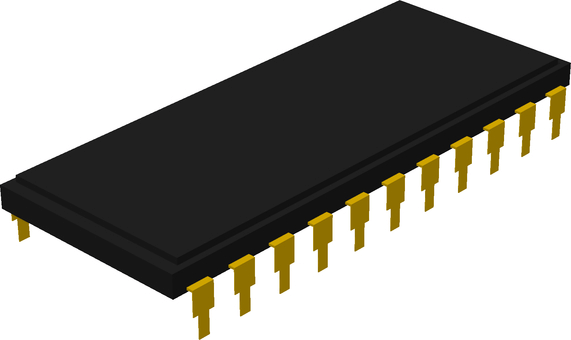
Figure 3. Mask ROM (MROM) Chip
Mask Read-Only Memory (MROM) is the earliest and most basic form of ROM. It is created by physically encoding data into the integrated circuit during the semiconductor fabrication process. The "mask" in its name refers to the photomasks used in the manufacturing stage, which define the precise arrangement of transistors and connections that represent the stored data.
Because the information is embedded directly into the chip at the hardware level, MROM is extremely resistant to accidental modification, data corruption, or tampering. It is often used in systems where the stored instructions are universal and unchanging, such as factory-programmed firmware, preloaded lookup tables, or standardized control logic. The lack of reprogrammability makes it unsuitable for evolving technologies but ideal for products that require mass production with stable, unaltered data.
Programmable Read-Only Memory (PROM)
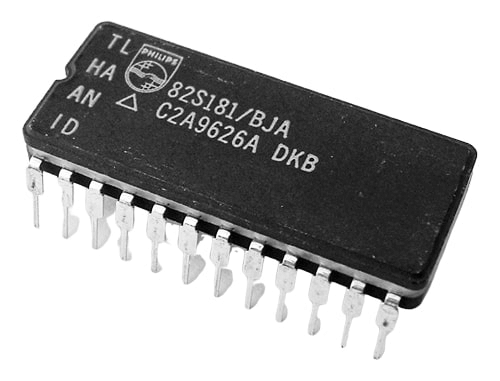
Figure 4. Programmable ROM (PROM) Chip
Programmable Read-Only Memory (PROM) is produced as a blank memory chip, which can later be customized by the user or developer. The customization is performed using a special device called a PROM programmer or PROM burner. This device applies controlled electrical pulses to selectively alter the internal fuses or links within the chip. Once a fuse is "burned," it permanently changes the logic state at that specific location, thereby encoding the desired data.
PROM is particularly valuable in cases where devices are produced in smaller batches or require specific configurations that cannot be predetermined at the factory stage. Its ability to be customized once and then preserved reliably makes it an efficient solution for tailored, permanent storage requirements.
EPROM (Erasable Programmable ROM)

Figure 5. Erasable Programmable ROM (EPROM) Chip
Erasable Programmable Read-Only Memory (EPROM) is designed with a special structure that allows data to be erased and rewritten, offering more adaptability than earlier ROM forms. The memory cells inside an EPROM chip use floating-gate transistors, which can trap electrical charges to represent stored information. Programming is achieved by applying a high voltage that forces electrons onto the floating gate, creating a permanent charge pattern that defines the data.
What makes EPROM distinct is its ability to be erased through exposure to ultraviolet (UV) light. The chip is manufactured with a transparent quartz window on top, which lets UV light penetrate and discharge the trapped electrons from the floating gates. Once this process is complete, all stored information is cleared, returning the chip to its original blank state.
Although the erasure process is time-consuming and clears the entire memory at once, EPROM provides a practical balance between permanence and reusability. It allows developers to refine or update the stored program multiple times throughout the development or testing phases without needing a completely new chip.
EEPROM (Electrically Erasable PROM):

Figure 6. Electrically Erasable PROM (EEPROM) Chip
Electrically Erasable Programmable Read-Only Memory (EEPROM) uses an internal structure based on floating-gate transistors, similar to EPROM, but introduces a more convenient method for modifying data. Instead of relying on ultraviolet exposure, EEPROM cells can be reset and rewritten by applying carefully controlled electrical charges directly through the chip’s circuitry. This makes the process more practical, as no physical removal or external erasure device is required.
One of the defining characteristics of EEPROM is its ability to target specific memory locations for erasure or rewriting. This selective control gives it a finer level of precision, making it useful in situations where only a portion of the data needs to be changed rather than the entire contents. Each memory cell can be independently addressed, allowing updates to occur without disturbing the rest of the stored information.
While EEPROM is not designed for high-speed or high-frequency modifications, its flexibility and convenience make it especially effective in scenarios where occasional reprogramming is necessary. The ability to adjust stored data directly within the system ensures that it can support long-term functionality with minimal disruption.
Flash Memory

Figure 7. Flash Memory Chip
Flash Memory refines the design of electrically erasable memory by introducing a block-based architecture that allows larger sections of data to be erased and rewritten in a single operation. Instead of modifying one byte or cell at a time, entire blocks of memory are managed together, which drastically improves both speed and efficiency. This structural change reduces the overhead of repetitive erasure cycles and makes flash storage more practical for handling larger amounts of data.
Another defining feature of Flash Memory is its compact physical design, which enables higher storage capacity within small chip sizes. This density is achieved by integrating memory cells more closely together, often using floating-gate transistors arranged in arrays. The block-erase method not only accelerates performance but also minimizes the wear caused by repeated write operations, extending the usable life of the memory compared to earlier erasable forms.
Because of its efficiency and durability, Flash Memory has become a preferred solution for systems that demand frequent access to stored data while still retaining information without power. Its combination of speed, capacity, and reusability makes it well-suited for both portable storage media and embedded storage within modern digital devices.
ROM vs. RAM

Figure 8. ROM vs RAM
|
Feature |
ROM |
RAM |
|
Volatility |
Non-volatile, data remains even when power is turned off. This ensures that stored instructions are always available | Volatile. Data is erased when the system is powered down, requiring a constant power supply to retain information |
|
Primary Use |
Stores permanent instructions such as firmware and startup programs. It serves as a fixed reference for system operation | Holds temporary data for active processes and applications. It acts as a working space for the CPU |
|
Capacity |
Typically small, often in the range of a few megabytes. This is sufficient for firmware and essential control instructions | Much larger, ranging from gigabytes to hundreds of gigabytes. It supports multitasking and heavy applications |
|
Speed |
Slower access. It is not optimized for frequent read or write operations but rather for reliable data retention | Much faster. It is designed for rapid data access and constant updating during active use |
|
Flexibility |
Difficult or impossible to modify once written. Updates may require specialized methods or replacement | Fully writable and erasable. This allows constant changes to data as programs run |
Applications of ROM

Figure 9. ROM Chips on Circuit Board
Boot Firmware (BIOS and UEFI)
In personal computers, ROM stores firmware instructions that guide the startup sequence. This firmware, known as the BIOS or UEFI, performs initial hardware checks and loads the operating system into RAM. By holding these unchanging instructions, ROM ensures the system starts consistently and without error.
Video Game Consoles
In cartridge-based gaming systems, ROM is used to store permanent game data. Because this data cannot be modified during normal use, the game runs the same way every time it is accessed. This design guarantees reliability and eliminates the risk of accidental changes to the stored software.
Optical Storage
ROM is also applied in optical media, such as CD-ROMs and DVD-ROMs. These formats provide data in a read-only state, ensuring that the stored music, video, or software remains unchanged over time. The use of ROM in optical storage allows for stable distribution of digital content that does not require rewriting.
Embedded Devices
Many smaller systems, including calculators, printers, and household appliances, make use of ROM to hold their operating instructions. In some cases, ROM also stores small sets of data such as fonts. Because the stored information does not change, these devices operate predictably each time they are turned on.
Mobile Devices and Automotives
In mobile devices, ROM contains parts of the operating system and boot loaders that are necessary for the device to begin functioning. Automotive systems also rely on ROM to store engine control firmware, digital displays, and dashboard functions. These applications highlight the need for reliable, unchanging instructions that remain intact throughout the lifespan of the equipment.
Advantages and Disadvantages of ROM
|
Advantages |
Disadvantages |
| Provides permanent storage, ensuring programs and instructions remain secure once written | Limited flexibility, since changes are very difficult or impossible after programming |
| Non-volatile, meaning data is preserved even when the device is powered off | Slower speed compared to RAM, making it unsuitable for frequent read and write operations |
| Highly reliable, as the contents are less prone to corruption or accidental modification | Low storage capacity, usually restricted to a few megabytes per chip |
| Cost-effective to produce, often less expensive than other forms of memory like RAM | Cannot easily support updates, requiring replacement or specialized methods when changes are needed |
| Simple in design, which makes ROM easier to test, maintain, and integrate into systems | Not optimized for handling large or dynamic datasets |
Conclusion
ROM is a type of memory that keeps data safe even when the power is off. It works by storing permanent instructions that help your device start and run. There are many types of ROM, each with its own way of storing data, from fixed chips to reprogrammable ones like flash memory. Unlike RAM, ROM is slower and smaller, but it is reliable for storing programs that do not change. You use it every day in computers, phones, and even household gadgets. Knowing how ROM works helps you understand why your devices always start the same way and perform consistently.
About us
ALLELCO LIMITED
Read more
Quick inquiry
Please send an inquiry, we will respond immediately.
Frequently Asked Questions [FAQ]
1. What does ROM stand for and what does it do?
ROM stands for Read-Only Memory. It is a type of memory chip that stores data permanently, even when the power is turned off. Its main job is to hold instructions like firmware that help your device start and work properly.
2. How is ROM different from RAM?
ROM keeps its data even when the device is off, while RAM loses everything once power is gone. ROM is used for permanent instructions like startup code, but RAM is used for temporary data while programs are running.
3. Can data in ROM be changed?
In most ROM types, the data cannot be changed easily. Some versions, like PROM, EPROM, EEPROM, and Flash, allow limited changes, but standard ROM is usually fixed once made. This makes it reliable for permanent instructions.
4. Where is ROM used in everyday life?
You can find ROM in computers, phones, video game consoles, printers, calculators, and even cars. It stores programs that control how the device starts, runs, or performs certain functions without needing updates.
5. What are the main advantages of ROM?
ROM is permanent, reliable, and does not lose data when the power is off. It is also cheaper than RAM and easier to maintain. These features make it a good choice for storing important programs that need to stay the same.

The Extensive Guide to High-Pass Filters in Modern Electronics
on July 2th

Magnetic Fields Decoded: Principles, Measurements, and Practical Uses
on July 1th
Popular Posts
-

Complex Instruction Set Computers: How They Changed Computing?
on June 4th 148298
-

USB-C Pinout and Features
on June 4th 129904
-

Using Xilinx Unified Simulation Primitives: A Comprehensive Guide to FPGA Design and Simulation
on June 4th 111778
-

Power Supply Voltages in Electronics: Meaning of VCC, VDD, VEE, VSS, and GND
on June 4th 93324
-

RJ45 Connector Guide: Pinout, Wiring, Cable Types, and Uses
on January 1th 92002
-

The Ultimate Guide to Wire Color Codes in Modern Electrical Systems
The way our electrical systems use colors isn’t just for looks. Each wire color now indicates a specific function, making it easier to identify and handle electrical components correctly during ins...on January 1th 76116
-

Quality (Q) Factor: Equations and Applications
The quality factor, or 'Q', is important when checking how well inductors and resonators work in electronic systems that use radio frequencies (RF). 'Q' measures how well a circuit minimizes energy...on January 1th 74018
-

Purge Valve Guide: Function, Symptoms, Testing, and Replacement for Optimal Engine Performance
The purge valve is a key part of a car’s system that helps keep the air clean by managing fuel vapors before they can escape into the atmosphere. This not only helps the environment by reducing pol...on January 1th 68021
-

Understanding Capacitors and Their Symbols in Circuit Diagrams
Capacitors are small parts used in almost all electronic devices. They store and release electrical energy and are found in things like power supplies, radios, and circuits that help reduce noise. ...on June 4th 57890
-

A23 Battery Specifications and Compatibility
The A23 battery is a small, cylinder-shaped battery with high voltage. Also called 23A, 23AE, or MN21, it runs at 12 volts and much higher than AA or AAA batteries. Its special design make...on January 1th 57471
HOT Part Number
-
RC0402JR-072K7L
Yageo
RES SMD 2.7K OHM 5% 1/16W 0402
1N5335B
Microsemi Corporation
DIODE ZENER 3.9V 5W T18
VI-263-IY
Vicor Corporation
DC DC CONVERTER 24V 50W
XRT75L00IV-F
MaxLinear, Inc.
IC TELECOM INTERFACE 52TQFP
TLV3502AQDCNRQ1
Texas Instruments
IC COMPARATOR 2 GEN PUR SOT23-8
MP2308GD-Z
Monolithic Power Systems Inc.
IC REG BUCK ADJ 4A 14FCQFN
TSV632IDT
STMicroelectronics
IC OPAMP GP 2 CIRCUIT 8SOIC
KST5088MTF
onsemi
TRANS NPN 30V 0.05A SOT23-3
R5000615XXWA
Powerex Inc.
DIODE GEN PURP 600V 150A DO205AA
AS1217MY
onsemi
INTEGRATED CIRCUIT
BCM5482SHEA2KFBG
Broadcom Limited
DUAL PORT 10/100/1000BASE-T PH S
FJB3307DTM
onsemi
TRANS NPN 400V 8A D2PAK
MAX1617MEE
Analog Devices Inc./Maxim Integrated
SENSOR DIGITAL -55C-125C 16QSOP
UHE1H182MHD
Nichicon
CAP ALUM 1800UF 20% 50V RADIAL
VI-J1L-IX
Vicor Corporation
DC DC CONVERTER 28V 75W
TS334IYDT
STMicroelectronics
IC COMPARATOR 4 GEN PUR 14SO
FCD5N60-F085
onsemi
FCD5N60_F085 - N-CHANNEL SUPERFE
TPS389001DSER
Texas Instruments
IC SUPERVISOR 1 CHANNEL 6WSON -
BZX84C30S-7-F
Diodes Incorporated
DIODE ZENER ARRAY 30V SOT363
DMN2015UFDE-7
Diodes Incorporated
MOSFET N-CH 20V 10.5A 6UDFN
C2139NLT
Pulse Electronics
XFRMR BALUN FOR WIDEBAND RF APP
SI8231BB-D-ISR
Skyworks Solutions Inc.
DGTL ISO 2.5KV GATE DRVR 16SOIC
AD9058AJD
Analog Devices Inc.
IC ADC 8BIT FLASH 48CDIP
TZM5244B-GS08
Vishay General Semiconductor - Diodes Division
DIODE ZENER 14V 500MW SOD80
MAX4377HAUA
Analog Devices Inc./Maxim Integrated
IC CURRENT SENSE 2 CIRCUIT 8UMAX
C3216X7R2E683K160AA
TDK Corporation
CAP CER 0.068UF 250V X7R 1206
EL8403IUZ
Renesas Electronics America Inc
IC OPAMP GP 4 CIRCUIT 16QSOP
LM193AH
Texas Instruments
IC COMPARATOR 2 GEN PUR TO99-8
7440520018
Würth Elektronik
FIXED IND 1.8UH 2.6A 35 MOHM SMD
1808CC102KAT9A
KYOCERA AVX
CAP CER 1000PF 630V X7R 1808
LP3936SLX
Texas Instruments
IC LED DRV RGLTR PWM 32TLGA
KA1H0165RTU
onsemi
IC OFFLINE SW MULT TOP TO220F
74F14PC
Fairchild Semiconductor
IC INVERT SCHMITT 6CH 1-IN 14DIP
FQP32N20C
onsemi
MOSFET N-CH 200V 28A TO220-3
STM1811LWX7F
STMicroelectronics
IC SUPERVISOR 1 CHANNEL SOT23-3
TSM900N06CH
Taiwan Semiconductor Corporation
60V, 11A, SINGLE N-CHANNEL POWER -

JANTX1N825-1
Microchip Technology
DIODE ZENER 5.9V 500MW DO35
MAX17113ETL+
Analog Devices Inc./Maxim Integrated
IC PWR SUPPLY FOR LCD TV 40TQFN
08055C473KAT2P
KYOCERA AVX
CAP CER 0.047UF 50V X7R 0805
B5819W
HY Electronic (Cayman) Limited
DIODE SCHOTTKY 40V 1A SOD123
SE15PDHM3/84A
Vishay General Semiconductor - Diodes Division
DIODE GEN PURP 200V 1.5A DO220AA
LM3671MF-1.2
Texas Instruments
IC REG BUCK 1.2V 600MA SOT23-5
CD74HC238E
Texas Instruments
IC DECODER/DEMUX 1X3:8 16DIP
IXTY02N120P-TRL
IXYS
MOSFET N-CH 1200V 200MA TO252
FAR-G5KK-911M50-D4KE-Z
Taiyo Yuden
FILTER SAW 911.5MHZ 10SMD
VE-BAMD-EL
Vicor Corporation
HB VE-BAMD-EL ROHS
IR2085STR
Infineon Technologies
IC GATE DRVR HALF-BRIDGE 8SOIC
74F11PC
Fairchild Semiconductor
IC GATE AND 3CH 3-INP 14DIP
CIGT252010EH1R0MNE
Samsung Electro-Mechanics
FIXED IND 1UH 4.1A 30 MOHM SMD
BZX84C24-7-F
Diodes Incorporated
DIODE ZENER 24V 300MW SOT23-3
MT25QL256ABA1EW9-0SIT
Micron Technology Inc.
IC FLASH 256MBIT SPI 8WPDFN
TC1017-2.9VCTTR
Microchip Technology
IC REG LINEAR 2.9V 150MA SOT23-5
PIC16C74B-20I/PT
Microchip Technology
IC MCU 8BIT 7KB OTP 44TQFP
MX25L8006EM1J-12G
Macronix
IC FLASH 8MBIT SPI 86MHZ 8SOP