
Proximity Sensors Explained: Types, Working, Selection and Applications
Proximity sensors is a device that can detect objects without touching them. It explains the different kinds of sensors, how each one works, and where they are used. You’ll also learn how to choose the right type for your needs, how they compare to limit switches, and how to check if a sensor is blocked or not working properly.Catalog

Figure 1. Proximity Sensors
What are Proximity Sensors?
Proximity Sensors are electronic devices that detect when an object is nearby without needing to touch it. They work by emitting a field or signal (like a magnetic field, infrared beam, or sound wave) and watching for disruptions when something enters the detection area. When the sensor notices a change, it sends an electrical signal to indicate the presence of the object. Proximity sensors are often called "proximity switches" because they serve a similar purpose as traditional switches, starting or stopping an action without any moving parts.
Since they operate without physical contact, they don’t suffer from mechanical wear or contamination from dust, oil, or moisture. This leads to a longer lifespan, higher reliability, and less maintenance. They’re commonly used for detecting object positions, counting items, or checking for the presence of parts in an assembly. Industries ranging from automotive to electronics and robotics rely on them for precise, contact-free detection.
Features of Proximity Sensors
• Non-Contact Detection
Proximity sensors detect objects without physical contact by sensing changes in electromagnetic or electric fields. This reduces mechanical wear and simplifies maintenance, making them ideal for long-term use in harsh environments.
• Durable Housing
Many models are enclosed in rugged, sealed housings rated for resistance to water, oil, and dust. This makes them highly reliable in industrial settings where exposure to contaminants is common.
• Solid-State Design
Most proximity sensors use solid-state components, allowing for faster switching speeds and longer lifespans compared to mechanical switches. This enhances reliability and reduces the need for frequent replacements.
• Insensitive to Object Color or Texture
Capacitive and inductive sensors can detect a wide range of materials regardless of color, finish, or texture. This ensures consistent performance even with irregular or non-uniform targets.
• Adjustable Detection Ranges and Diagnostics
Some models feature customizable sensing ranges, built-in diagnostics, and status indicators. These tools help streamline setup and troubleshooting in automated systems.
• Support for Multiple Output Types
Sensors are available with analog and digital outputs, including PNP, NPN, and voltage signals. This variety makes them compatible with different control systems and applications.
Types of Proximity Sensors
Proximity sensors are categorized by how they detect objects. Each type is designed for certain materials or conditions.
Capacitive Sensors

Figure 2. Capacitive Proximity Sensors
Capacitive sensors detect objects by measuring changes in an electric field, which allows them to sense a wide range of materials including plastics, liquids, powders, and other non-metallic substances. They are useful in applications where the target is not metal, such as detecting fluid levels through container walls or sensing wood or glass. What makes capacitive sensors stand out is their versatility in material detection. Unlike inductive sensors, they do not rely on the target being conductive or metallic, giving them broader usage across industries.
Inductive Sensors

Figure 3. Inductive Proximity Sensors
Inductive sensors operate by generating an electromagnetic field and detecting disruptions caused by metallic objects entering the field. These sensors are highly reliable when detecting metals like iron, steel, aluminum, or copper, and are commonly used in manufacturing and automation. Their strength lies in their durability and resistance to environmental contaminants such as dust, moisture, and oil. Unlike capacitive sensors, inductive sensors are limited to metal detection, but their rugged design makes them ideal for heavy-duty industrial use.
Photoelectric Sensors
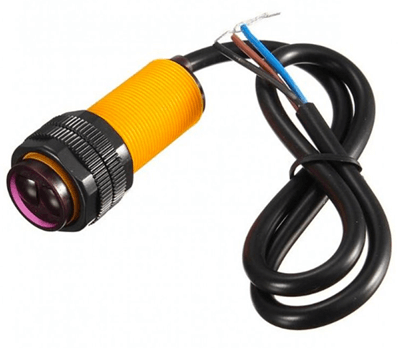
Figure 4. Photoelectric Proximity Sensor
Photoelectric sensors use a beam of light, typically infrared or visible to detect the presence or absence of objects. They can sense a wide range of materials, including transparent, reflective, or irregularly shaped objects, making them highly flexible. Their long detection ranges and fast response times make them ideal for conveyor systems, packaging lines, and presence detection. Compared to capacitive and inductive types, photoelectric sensors are less dependent on material type and more suitable for non-contact, high-speed applications.
Ultrasonic Sensors
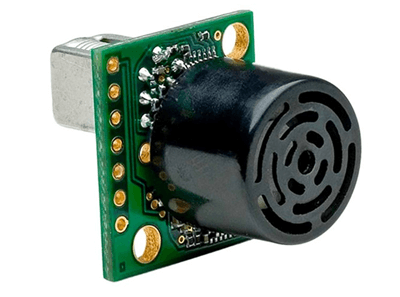
Figure 5. Ultrasonic Proximity Sensor
Ultrasonic sensors emit high-frequency sound waves and detect changes in the echo time to measure distance or presence. They are effective at detecting non-reflective or oddly shaped objects, as well as materials that do not reflect light well, like liquids or soft fabrics. These sensors are immune to color, transparency, and surface texture, making them a great alternative when photoelectric sensors may fail. While they tend to have slower response times, their ability to function reliably in dusty or misty environments sets them apart.
Magnetic Sensors

Figure 6. Magnetic Proximity Sensor
Magnetic sensors detect the presence of a magnetic field, usually from a nearby permanent magnet, and are used in environments where other sensors might struggle due to interference or contamination. They are highly reliable in extreme conditions such as high humidity, dirt, or enclosed systems where direct line-of-sight isn't possible. These sensors are simple yet robust, and are often found in safety switches, door positioning, or sealed containers. Unlike the other sensor types, magnetic sensors require a magnet as a target, which limits their scope but enhances reliability in rugged environments.
How Proximity Sensors Work?
Proximity sensors work by generating a field or signal such as electrical, magnetic, optical, or sound and watching for changes, when something enters that zone. When an object disrupts this signal, the sensor detects the change and sends an output.

Figure 7. Capacitive Proximity Sensor Diagram
First is the capacitive sensor. It operates by creating an electrostatic field between two internal electrodes. When a material with a different dielectric constant enters this field, it changes the capacitance. Once the change reaches a set threshold, the sensor’s circuit triggers an output.

Figure 8. Inductive Proximity Sensor Diagram
Next is the inductive sensor. It generates a high-frequency electromagnetic field using a coil. When a metal object enters this field, it induces eddy currents in the metal, which in turn reduce the field strength. The sensor detects this change and activates the output.

Figure 9. Photoelectric Proximity Sensor Diagram
Then comes the photoelectric sensor. It works by emitting a light beam and monitoring how the light is affected either blocked, reflected, or scattered by an object. The internal receiver senses this change and sends a signal when the expected light pattern is disrupted.

Figure 10. Ultrasonic Proximity Sensor Diagram
After that is the ultrasonic sensor. It emits short bursts of ultrasonic sound waves and measures the time it takes for the echo to return from a nearby object. The sensor uses this time delay to calculate the distance and determine if an object is present.

Figure 11. Magnetic Proximity Sensor Diagram
Lastly is the magnetic sensor. It detects magnetic fields from a nearby permanent magnet. Reed switches open or close a circuit when exposed to the magnet, while Hall-effect sensors produce a voltage based on changes in magnetic flux, which is then used to trigger the output.
Proximity Sensor vs. Limit Switch

Figure 12. Limit Switch and Proximity Sensor
Proximity sensors and limit switches are both used for object detection, but they operate differently. The table below compares their key features to highlight how each fits specific applications.
|
Feature |
Proximity
Sensor |
Limit Switch |
|
Detection Method |
Non-contact |
Requires mechanical contact with the target |
|
Mechanical Wear |
None; no moving parts |
Subject to wear and tear due to moving components |
|
Response Speed |
Fast; suitable for high-speed applications |
Slower; mechanical actuation takes time |
|
Service Life |
Long; minimal mechanical degradation |
Shorter; moving parts wear out |
|
Sensing Distance |
Adjustable; short to medium range depending on type |
Fixed; very short actuation range |
|
Environmental Resistance |
High; resistant to dust, oil, moisture, and vibration |
Moderate; may fail in dirty or wet conditions |
|
Output Type |
Electronic (PNP, NPN, analog, relay) |
Mechanical contacts (NO/NC) |
|
Installation Options |
Compact; flexible mounting (flush/non-flush) |
Bulkier; limited mounting positions |
|
Maintenance Needs |
Low; infrequent cleaning or inspection |
High; requires regular inspection and cleaning |
|
Cost |
Generally more expensive |
Typically more affordable |
|
Shock/Vibration Sensitivity |
Low; resistant to shock and vibration |
Higher; can misfire or fail under mechanical stress |
|
Power Consumption |
Requires continuous electrical power |
Typically passive until activated |
|
Signal Stability / Debounce |
Clean signal; minimal noise |
May require debounce handling due to contact bounce |
|
Safety/Fail-safe Behavior |
May be sensitive to EMI or power loss |
Predictable mechanical failure modes |
|
Integration with PLCs/Controllers |
Easy; wide range of signal outputs available |
Moderate; may need additional interface circuitry |
Choosing the Right Proximity Sensor
Step 1: Identify the Target Material
Begin by determining what kind of material the sensor needs to detect. Inductive sensors are ideal for metal objects because they operate using electromagnetic fields, which metal disrupts reliably. However, if you need to detect plastic, glass, liquids, or other non-metallic substances, inductive sensors won’t work. In those cases, capacitive, ultrasonic, or photoelectric sensors are better suited, as they can sense a broader range of materials.
Step 2: Determine the Required Sensing Range
Next, assess how far away the object will be from the sensor during detection. Inductive and capacitive sensors usually function best at short distances, typically a few millimeters to a few centimeters. If your application requires longer-range detection such as detecting objects from several inches to a few feet away, ultrasonic or photoelectric sensors are a better fit. They use sound waves or light beams to detect objects at greater distances with precision.
Step 3: Evaluate the Operating Environment
The environment in which the sensor will be used plays a big role in sensor selection. High temperatures, exposure to chemicals, moisture, or strong electromagnetic interference can degrade performance or cause failures. In such harsh conditions, choose sensors that are rugged, sealed, or shielded to ensure reliable operation over time. Environmental durability is important in industrial, outdoor, or washdown applications.
Step 4: Check Mounting Space Constraints
Consider the physical space where the sensor will be installed. If the area is tight or confined, choose compact sensors or models designed to be flush-mounted into surfaces. For open areas where space isn’t a concern, standard-size sensors or those requiring a direct line-of-sight, such as photoelectric types, may offer better performance. Proper mounting ensures that the sensor can work without obstruction or misalignment.
Step 5: Match the Output Type to Your Control System
Finally, make sure the sensor’s output matches what your control system can accept. Common output types include PNP or NPN transistor signals, analog voltage levels, or relay contacts. Using an incompatible output can cause communication issues or even damage your system. Double-check both the sensor specs and the input requirements of your control unit before making a final selection.
Diagnosing a Blocked Proximity Sensor
• Perform a Visual Inspection
Begin by examining the sensor closely for any visible obstructions. Common culprits include dirt, oil, moisture, or metal shavings, especially if the sensor is used in industrial environments. These materials can block the sensing face, particularly for capacitive or photoelectric sensors. A quick visual check often reveals buildup that interferes with proper operation.
• Clean the Sensor Surface Carefully
If debris is present, gently clean the sensor using a lint-free cloth and an appropriate non-abrasive cleaner. Avoid using rough materials or high-pressure air, as these can scratch the lens or damage the sensor housing. Take extra care around sensitive optics or sealing edges. A clean surface is needed for accurate signal transmission and reception.
• Test the Sensor's Reaction
After cleaning, bring a known test object into the sensor’s detection range. Check for a response by observing the sensor’s built-in LED indicator or by monitoring the output signal on the connected controller. If there’s no reaction, verify that the object is within range, properly aligned, and that the sensor is powered. This step confirms whether the blockage has been cleared or if further troubleshooting is needed.
• Check Electrical Output
Use a multimeter to test the sensor’s voltage levels or output signal while it operates. Compare the readings to the manufacturer’s specifications to ensure they fall within the expected range. For smart sensors or those on a network, consult diagnostic software to look for error codes or communication faults. Electrical testing can help isolate problems with wiring or internal sensor failures.
• Consider Environmental Interference
If the sensor still fails to respond, evaluate the surrounding environment for interference sources. High temperatures, strong vibrations, or electromagnetic noise can disrupt sensor performance. In such cases, repositioning the sensor or adding shielding might improve reliability. Routine inspections and preventive maintenance can help avoid these issues in the future and extend sensor life.
Advantages and Disadvantages of Proximity Sensors
|
Advantages |
Disadvantages |
|
No physical contact means less wear and
longer life |
Inductive sensors can’t detect
non-metallic materials |
|
Fast response times support high-speed
systems |
Performance may drop with dust buildup or
extreme EMI |
|
Accurate across a variety of materials
and settings |
Shorter sensing range than vision or
radar systems |
|
Small size fits into compact machines |
Capacitive and ultrasonic sensors are
sensitive to environmental changes |
|
Solid-state design increases reliability |
Poor calibration may lead to false
signals |
|
Resistant to dirt, oil, moisture, and
vibration |
Magnetic sensors require a precisely
aligned magnet to work reliably |
|
Minimal maintenance required |
Limited functionality in long-distance
detection applications |
|
Safe for use in hygienic or hazardous
environments |
May have higher initial cost compared to
mechanical switches |
Applications of Proximity Sensors
Industrial Automation
Proximity sensors play a role in monitoring the position of machine components and detecting items on conveyor belts. They are used to trigger robotic arms and automated tools with high precision. On assembly lines, these sensors ensure that parts are correctly positioned before operations like welding, labeling, or inspection. This improves both efficiency and product quality.
Automotive Systems
Proximity sensors enhance safety and convenience in vehicles. They are used for obstacle detection, automatic parking systems, and keyless smart locks. Ultrasonic sensors help drivers with reverse alerts by detecting nearby objects. Hall-effect sensors track the positions of pedals and other moving parts to support advanced driver-assistance systems.
Consumer Electronics
Smartphones and tablets use proximity sensors to detect when a device is held close to the face, turning off the screen during calls to prevent accidental input. They also enable gesture controls for touch-free operation. These functions conserve battery life and enhance the experience. The sensors contribute to the sleek, responsive feel of modern devices.
Packaging and Material Handling
Proximity sensors are used to detect packages, count items, and control labeling or sorting machines. Their high-speed response helps manage the flow of goods on conveyors. By confirming the presence or position of materials, they prevent jams, misfeeds, and production delays. This ensures smooth and accurate handling in logistics and manufacturing.
Medical and Healthcare
In medical environments, proximity sensors support hygiene and precision by enabling touch-free interfaces and automated robotic tools. They are used to monitor fluid levels in IV bags, reagent containers, and other medical equipment. Capacitive sensors, in particular, offer sensitive, non-contact measurement. This helps reduce contamination risks and improve care accuracy.
Security and Access Control
Proximity sensors help secure homes and buildings by detecting the status of doors and windows in alarm systems. Magnetic and Hall-effect sensors are commonly used for their reliability and resistance to tampering. In smart locks, they verify the position of components to allow or restrict access. These features make modern security systems more robust and user-friendly.
Conclusion
Proximity sensors help detect objects quickly and without touching them, which makes them very useful in many types of machines and devices. Because they don’t have moving parts, they last a long time and need little maintenance. Each type of sensor works best in certain situations, some are good for metal, others for plastic or liquids. Compared to limit switches, proximity sensors are faster, more reliable, and better for tough environments. When choosing one, it’s important to think about what it needs to detect, how far it should sense, and where it will be placed. These sensors are used in many areas like industry, cars, electronics, healthcare, and security because they are small, fast, and dependable.
About us
ALLELCO LIMITED
Read more
Quick inquiry
Please send an inquiry, we will respond immediately.
Frequently Asked Questions [FAQ]
1. What is the difference between analog and digital proximity sensors?
Analog proximity sensors provide a continuous output that varies based on the distance to the target, allowing precise measurement of object position. Digital proximity sensors, on the other hand, give a simple on/off signal once an object is detected within the set range. Your choice depends on whether you need presence detection (digital) or distance monitoring (analog).
2. Can proximity sensors detect multiple objects at once?
No, standard proximity sensors typically detect the presence of any object within their sensing field but do not differentiate between multiple targets. For object counting or distinguishing between items, a combination of sensor placement, timing, or multiple sensor units may be necessary.
3. What power supply is needed to operate a proximity sensor?
Most proximity sensors operate on low DC voltage, commonly 10–30V DC. Some industrial-grade models are available with AC voltage options. It's important to ensure your sensor’s power requirements match your system to avoid malfunctions or damage during operation.
4. Can I use proximity sensors outdoors or in harsh environments?
Yes, many proximity sensors are designed with sealed housings (IP67 or higher) that resist water, dust, oil, and temperature extremes. For outdoor use or dirty industrial settings, look for models rated for environmental protection and stable performance under UV exposure, humidity, or temperature fluctuations.
5. What is the difference between shielded and unshielded proximity sensors?
Shielded (flush-mount) sensors are designed to be embedded into metal surfaces and offer a focused sensing field, reducing side detection. Unshielded (non-flush) sensors protrude from mounting surfaces and have a wider sensing field, ideal for open-area detection. The choice depends on available space and application needs.

Mastering the Use of Transistors as Switches
on June 4th

Exploring DIAC Functionality in Various Application Circuits
on May 31th
Popular Posts
-

Complex Instruction Set Computers: How They Changed Computing?
on June 4th 148298
-

USB-C Pinout and Features
on June 4th 129904
-

Using Xilinx Unified Simulation Primitives: A Comprehensive Guide to FPGA Design and Simulation
on June 4th 111778
-

Power Supply Voltages in Electronics: Meaning of VCC, VDD, VEE, VSS, and GND
on June 4th 93324
-

RJ45 Connector Guide: Pinout, Wiring, Cable Types, and Uses
on January 1th 92002
-

The Ultimate Guide to Wire Color Codes in Modern Electrical Systems
The way our electrical systems use colors isn’t just for looks. Each wire color now indicates a specific function, making it easier to identify and handle electrical components correctly during ins...on January 1th 76116
-

Quality (Q) Factor: Equations and Applications
The quality factor, or 'Q', is important when checking how well inductors and resonators work in electronic systems that use radio frequencies (RF). 'Q' measures how well a circuit minimizes energy...on January 1th 74018
-

Purge Valve Guide: Function, Symptoms, Testing, and Replacement for Optimal Engine Performance
The purge valve is a key part of a car’s system that helps keep the air clean by managing fuel vapors before they can escape into the atmosphere. This not only helps the environment by reducing pol...on January 1th 68021
-

Understanding Capacitors and Their Symbols in Circuit Diagrams
Capacitors are small parts used in almost all electronic devices. They store and release electrical energy and are found in things like power supplies, radios, and circuits that help reduce noise. ...on June 4th 57890
-

A23 Battery Specifications and Compatibility
The A23 battery is a small, cylinder-shaped battery with high voltage. Also called 23A, 23AE, or MN21, it runs at 12 volts and much higher than AA or AAA batteries. Its special design make...on January 1th 57471
HOT Part Number
-
RC0402JR-072K7L
Yageo
RES SMD 2.7K OHM 5% 1/16W 0402
1N5335B
Microsemi Corporation
DIODE ZENER 3.9V 5W T18
VI-263-IY
Vicor Corporation
DC DC CONVERTER 24V 50W
XRT75L00IV-F
MaxLinear, Inc.
IC TELECOM INTERFACE 52TQFP
TLV3502AQDCNRQ1
Texas Instruments
IC COMPARATOR 2 GEN PUR SOT23-8
MP2308GD-Z
Monolithic Power Systems Inc.
IC REG BUCK ADJ 4A 14FCQFN
TSV632IDT
STMicroelectronics
IC OPAMP GP 2 CIRCUIT 8SOIC
KST5088MTF
onsemi
TRANS NPN 30V 0.05A SOT23-3
R5000615XXWA
Powerex Inc.
DIODE GEN PURP 600V 150A DO205AA
AS1217MY
onsemi
INTEGRATED CIRCUIT
BCM5482SHEA2KFBG
Broadcom Limited
DUAL PORT 10/100/1000BASE-T PH S
FJB3307DTM
onsemi
TRANS NPN 400V 8A D2PAK
MAX1617MEE
Analog Devices Inc./Maxim Integrated
SENSOR DIGITAL -55C-125C 16QSOP
UHE1H182MHD
Nichicon
CAP ALUM 1800UF 20% 50V RADIAL
VI-J1L-IX
Vicor Corporation
DC DC CONVERTER 28V 75W
TS334IYDT
STMicroelectronics
IC COMPARATOR 4 GEN PUR 14SO
FCD5N60-F085
onsemi
FCD5N60_F085 - N-CHANNEL SUPERFE
TPS389001DSER
Texas Instruments
IC SUPERVISOR 1 CHANNEL 6WSON -
BZX84C30S-7-F
Diodes Incorporated
DIODE ZENER ARRAY 30V SOT363
DMN2015UFDE-7
Diodes Incorporated
MOSFET N-CH 20V 10.5A 6UDFN
C2139NLT
Pulse Electronics
XFRMR BALUN FOR WIDEBAND RF APP
SI8231BB-D-ISR
Skyworks Solutions Inc.
DGTL ISO 2.5KV GATE DRVR 16SOIC
AD9058AJD
Analog Devices Inc.
IC ADC 8BIT FLASH 48CDIP
TZM5244B-GS08
Vishay General Semiconductor - Diodes Division
DIODE ZENER 14V 500MW SOD80
MAX4377HAUA
Analog Devices Inc./Maxim Integrated
IC CURRENT SENSE 2 CIRCUIT 8UMAX
C3216X7R2E683K160AA
TDK Corporation
CAP CER 0.068UF 250V X7R 1206
EL8403IUZ
Renesas Electronics America Inc
IC OPAMP GP 4 CIRCUIT 16QSOP
LM193AH
Texas Instruments
IC COMPARATOR 2 GEN PUR TO99-8
7440520018
Würth Elektronik
FIXED IND 1.8UH 2.6A 35 MOHM SMD
1808CC102KAT9A
KYOCERA AVX
CAP CER 1000PF 630V X7R 1808
LP3936SLX
Texas Instruments
IC LED DRV RGLTR PWM 32TLGA
KA1H0165RTU
onsemi
IC OFFLINE SW MULT TOP TO220F
74F14PC
Fairchild Semiconductor
IC INVERT SCHMITT 6CH 1-IN 14DIP
FQP32N20C
onsemi
MOSFET N-CH 200V 28A TO220-3
STM1811LWX7F
STMicroelectronics
IC SUPERVISOR 1 CHANNEL SOT23-3
TSM900N06CH
Taiwan Semiconductor Corporation
60V, 11A, SINGLE N-CHANNEL POWER -

JANTX1N825-1
Microchip Technology
DIODE ZENER 5.9V 500MW DO35
MAX17113ETL+
Analog Devices Inc./Maxim Integrated
IC PWR SUPPLY FOR LCD TV 40TQFN
08055C473KAT2P
KYOCERA AVX
CAP CER 0.047UF 50V X7R 0805
B5819W
HY Electronic (Cayman) Limited
DIODE SCHOTTKY 40V 1A SOD123
SE15PDHM3/84A
Vishay General Semiconductor - Diodes Division
DIODE GEN PURP 200V 1.5A DO220AA
LM3671MF-1.2
Texas Instruments
IC REG BUCK 1.2V 600MA SOT23-5
CD74HC238E
Texas Instruments
IC DECODER/DEMUX 1X3:8 16DIP
IXTY02N120P-TRL
IXYS
MOSFET N-CH 1200V 200MA TO252
FAR-G5KK-911M50-D4KE-Z
Taiyo Yuden
FILTER SAW 911.5MHZ 10SMD
VE-BAMD-EL
Vicor Corporation
HB VE-BAMD-EL ROHS
IR2085STR
Infineon Technologies
IC GATE DRVR HALF-BRIDGE 8SOIC
74F11PC
Fairchild Semiconductor
IC GATE AND 3CH 3-INP 14DIP
CIGT252010EH1R0MNE
Samsung Electro-Mechanics
FIXED IND 1UH 4.1A 30 MOHM SMD
BZX84C24-7-F
Diodes Incorporated
DIODE ZENER 24V 300MW SOT23-3
MT25QL256ABA1EW9-0SIT
Micron Technology Inc.
IC FLASH 256MBIT SPI 8WPDFN
TC1017-2.9VCTTR
Microchip Technology
IC REG LINEAR 2.9V 150MA SOT23-5
PIC16C74B-20I/PT
Microchip Technology
IC MCU 8BIT 7KB OTP 44TQFP
MX25L8006EM1J-12G
Macronix
IC FLASH 8MBIT SPI 86MHZ 8SOP