How Does a Digital Multimeter Works?
A digital multimeter is a handy tool you use to measure voltage, current, resistance, and other electrical values. In this guide, you’ll learn what a DMM is, what its parts do, and how it works. You’ll also see simple steps for measuring voltage and current safely. To help you avoid common errors, you’ll find the most frequent mistakes and a clear comparison between digital and analog meters.Catalog
Parts of a Digital Multimeter

Figure 1. Parts of a Digital Multimeter
A DMM consists of several key components that work together to provide accurate measurements
• Digital Display - Shows measurement values, units, and indicators such as DC, AC, and battery level
• SEL (Select Yellow Options) - Switches to secondary functions printed in yellow
• REL (Relative Mode) - Sets the current reading as a reference to compare changes
• Hold Reading / LCD Backlight - Freezes the displayed value and turns on the screen backlight for better visibility
• BJT Port (hFE Reading) - Used to check transistor gain on bipolar junction transistors
• Turn OFF - Sets the meter to power off and save battery life
• DC Voltage (V—) - Measures direct voltage from batteries, power supplies, or circuits
• AC Voltage (V~) - Measures alternating voltage from outlets or AC systems
• AC Current (A~) - Measures alternating current flow in a circuit
• Continuity - Checks if a circuit is complete; gives a beep when the path is closed
• Diode Test - Tests whether a diode is functioning properly and allows current in only one direction
• BJT Gain Test - Measures transistor amplification (hFE)
• LED Test - Checks LED functionality and polarity
• Frequency (Hz) - Measures signal frequency in hertz
• Duty Cycle (%) - Shows the on/off ratio of a pulsed signal
• Capacitance (F) - Measures capacitor values
• Resistance Measurement (Ω) - Measures how much a component resists electrical flow
• DC Current (A—) - Measures direct current in low- or high-current circuits
• Dial (Rotary Selector Switch) - Main control used to choose the measurement function
• Low Current Port (mA/µA) - Input jack for measuring small currents
• High Current Port (10A/20A) - Input jack for measuring large currents safely
• Common Port (COM) - Connection point for the black probe; shared across all tests
• Port for Every Reading Except Current (VΩmA) - Jack used for voltage, resistance, continuity, diode, and frequency measurements
How a Digital Multimeter Works?
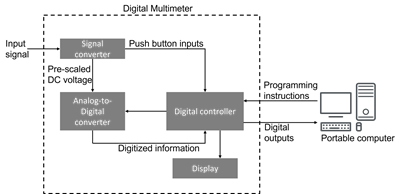
Figure 2. Working Principle of a Digital Multimeter
A digital multimeter works by converting an electrical signal into a readable digital value, and the figure shows this process step by step. The measurement first passes through the signal converter, which conditions and prepares the input so it can be processed safely and accurately.
Next, the conditioned signal enters the analog-to-digital converter (ADC), where it is transformed from an analog value into digital data. This digital information is then handled by the digital controller, which performs calculations, ranges the measurement, and ensures the reading is stable and precise.
After processing, the final value is sent to the display, where can view the measurement in clear numeric form. Some advanced digital multimeters can also send the processed data to a computer for logging and analysis. This entire flow (from signal converter to ADC, to digital controller, and finally to the display) is exactly what the figure represents.
How to Measure Voltage with a Digital Multimeter?
Measuring voltage is simple, but it requires correct settings and safe probe placement:
1. Select the mode: Choose DC voltage (V⎓) for batteries and DC systems, or AC voltage (V∿) for outlets and AC devices. Use a range higher than the expected voltage if your meter is not auto-ranging.
2. Connect the leads: Insert the black lead into COM and the red lead into the V/Ω jack. Never measure voltage with the lead in a current jack.
3. Place the probes: Touch the black probe to ground or the reference point and the red probe to the point where voltage is being measured.
4. Read the display: Observe the voltage value, polarity, and units. If “OL” appears, switch to a higher range.
5. Disconnect safely: Remove the red probe first, followed by the black probe.
How to Measure Current with a Digital Multimeter?
Measuring current poses more risk because the meter must be placed in series with the circuit:
1. Know the meter limits: Use the correct current jack (mA/µA or 10A). Avoid exceeding these ratings. Some high-current jacks may not be fused.
2. Turn off the power: Always de-energize the circuit before making changes. Consider using a clamp meter for safer, non-contact current measurement.
3. Insert the meter in series: Break the circuit at the measurement point. Connect the meter so current flows through it, red lead to the appropriate current jack, black to COM.
4. Select the range: Choose AC or DC current mode. Start with the highest range to avoid overload.
5. Restore power and measure: Re-energize the circuit and read the current value. Stop immediately if you see unusual readings or excessive heating.
6. Return the circuit to normal: Power down, remove the meter, and reconnect the wiring.
Common Mistakes When Using a Digital Multimeter
• Using the wrong jack: Measuring voltage with the probe in a current jack is one of the quickest ways to damage a DMM
• Treating current like voltage: Placing probes across a power source while in current mode creates a short circuit
• Ignoring CAT safety ratings: Using a low-rated meter on high-energy systems increases the risk of arc faults and failure
• Skipping relative mode: Forgetting to zero the meter can cause misleading results during precision measurements
• Measuring resistance on a live circuit: Resistance must be measured on de-energized circuits only
• Poor probe contact: Loose or dirty connections lead to unstable or incorrect readings
• Assuming all meters are equal: Not all DMMs offer True RMS or high accuracy at low current levels
• Overlooking blown fuses: A blown fuse can cause the meter to display zero current, always replace with the exact specified fuse
Digital Multimeter vs. Analog Multimeter
|
Feature |
Digital
Multimeter (DMM) |
Analog
Multimeter (AMM) |
|
Display
Type |
Digital
numeric display |
Moving
needle on scale |
|
Reading
Accuracy |
Highly
accurate |
Less
accurate |
|
Ease
of Reading |
Very
easy for beginners |
Susceptible
to parallax error |
|
Input
Impedance |
High;
minimal circuit impact |
Lower;
may affect readings |
|
Measurement
Speed |
Quick,
stable readings |
Slower
but shows trends smoothly |
|
Measuring
Range |
Auto-range
in most models |
Usually
manual range |
|
Extra
Features |
Continuity,
capacitance, frequency, diode test, etc. |
Limited
features |
|
Durability |
Sensitive
to drops |
More
rugged |
|
Battery
Use |
Requires
battery |
Often
works without batteries (except resistance) |
|
AC
Accuracy |
True
RMS models excel |
Less
accurate for complex waveforms |
|
Data
Hold |
Available |
Not
available |
|
Safety
Rating |
CAT-rated
for modern safety |
Older
units may lack ratings |
|
Fluctuation
Display |
Digital
step updates |
Smooth
needle movement |
Conclusion
A digital multimeter gives accurate readings and is helpful for many electrical tests. Knowing its parts and how it works makes it easier and safer to use. Avoiding common mistakes helps prevent damage and incorrect results. Understanding the differences between digital and analog multimeters also helps to choose the right tool for the job.
About us
ALLELCO LIMITED
Read more
Quick inquiry
Please send an inquiry, we will respond immediately.
Frequently Asked Questions [FAQ]
1. Can a digital multimeter get damaged easily?
A DMM can be damaged if you use the wrong jack, measure voltage in current mode, or exceed its rating. Always double-check your settings and connections before testing to avoid internal fuse damage or short circuits.
2. What safety rating should I look for in a digital multimeter?
Look for CAT II for household electronics, CAT III for panel boards and branch circuits, and CAT IV for service entrances or high-energy environments. Higher CAT ratings offer better protection from electrical spikes.
3. How long does a digital multimeter usually last?
A quality DMM can last many years if stored properly, kept dry, and protected from drops. Replacing worn test leads and using proper fuses also helps extend its lifespan.
4. Can I test batteries with a digital multimeter?
Yes. Set the DMM to DC voltage, place the probes on the battery terminals, and compare the reading to the battery’s rated voltage. A significantly lower value usually means the battery is weak or dead.
5. Is it safe to measure live wires with a digital multimeter?
Yes, as long as you use the correct settings, proper probe placement, and a DMM with an appropriate CAT rating. Avoid touching exposed metal parts and always connect the black probe first.

Understanding Capacitors and Their Symbols in Circuit Diagrams
on September 6th
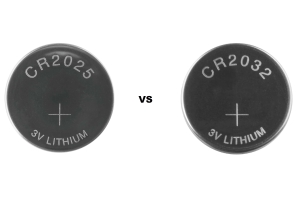
CR2025 Vs. CR2032 Battery
on September 4th
Popular Posts
-

Complex Instruction Set Computers: How They Changed Computing?
on April 18th 147749
-

USB-C Pinout and Features
on April 18th 111904
-

Using Xilinx Unified Simulation Primitives: A Comprehensive Guide to FPGA Design and Simulation
on April 18th 111349
-

Power Supply Voltages in Electronics: Meaning of VCC, VDD, VEE, VSS, and GND
on April 18th 83714
-

RJ45 Connector Guide: Pinout, Wiring, Cable Types, and Uses
on January 1th 79502
-

The Ultimate Guide to Wire Color Codes in Modern Electrical Systems
The way our electrical systems use colors isn’t just for looks. Each wire color now indicates a specific function, making it easier to identify and handle electrical components correctly during ins...on January 1th 66869
-

Quality (Q) Factor: Equations and Applications
The quality factor, or 'Q', is important when checking how well inductors and resonators work in electronic systems that use radio frequencies (RF). 'Q' measures how well a circuit minimizes energy...on January 1th 63004
-

Purge Valve Guide: Function, Symptoms, Testing, and Replacement for Optimal Engine Performance
The purge valve is a key part of a car’s system that helps keep the air clean by managing fuel vapors before they can escape into the atmosphere. This not only helps the environment by reducing pol...on January 1th 62943
-

Achieving Peak Performance with the Maximum Power Transfer Theorem
The Maximum Power Transfer Theorem explains how energy from a source, such as a battery or generator, flows to a connected load. It shows the exact condition where the load receives the most power....on January 1th 54076
-

A23 Battery Specifications and Compatibility
The A23 battery is a small, cylinder-shaped battery with high voltage. Also called 23A, 23AE, or MN21, it runs at 12 volts and much higher than AA or AAA batteries. Its special design make...on January 1th 52088
HOT Part Number
-
LTC4063EDD#TRPBF
Analog Devices Inc.
IC BATT CHG LI-ION 1CELL 10DFN
MIMX8MM1CVTKZAA
NXP USA Inc.
IC MPU I.MX 8M MINI SOLOLITE
APDS-9005-020
Broadcom Limited
SENSOR OPT 500NM AMB 6CHIPLED
06031A820KAT2A
KYOCERA AVX
CAP CER 82PF 100V C0G/NP0 0603
ICM-20602
TDK InvenSense
IMU ACCEL/GYRO/TEMP I2C/SPI LGA
170M4611
Eaton - Bussmann Electrical Division
FUSE SQUARE 350A 700VAC RECT
08053C105JAZ2A
KYOCERA AVX
CAP CER 1UF 25V X7R 0805
EP1C12F324C6N
Intel
IC FPGA 249 I/O 324FBGA
2SC4617T1G
onsemi
TRANS NPN 50V 0.1A SC75 SOT416
TL431AILPRAG
onsemi
IC VREF SHUNT ADJ 1% TO92-3
ADAU1787BCBZRL
Analog Devices Inc.
4 ADC, 2 DAC LOW POWER CODEC, AU
74VHC164MTCX
onsemi
IC SHIFT REGISTER 8BIT 14TSSOP
DAN222M3T5G
onsemi
DIODE ARRAY GP 80V 100MA SOT723
NR3015T470M
Taiyo Yuden
FIXED IND 47UH 300MA 1.608OHM SM
MM3Z18VC
onsemi
DIODE ZENER 18V 200MW SOD323F
1N4001W
Rectron USA
DIODE GEN 1A 50V SOD-123F
SMBJ90A
Taiwan Semiconductor Corporation
TVS DIODE 90VWM 146VC DO214AA
NTA1215MC
Murata Power Solutions Inc.
DC DC CONVERTER +/-15V 1W -
SDR1307-101KL
Bourns Inc.
FIXED IND 100UH 1.9A 180MOHM SMD
AOT5B65M1
Alpha & Omega Semiconductor Inc.
IGBT 650V 5A TO220
STP16CP596B1R
STMicroelectronics
IC LED DRIVER LINEAR 50MA 24DIP
AD7895ANZ-2
Analog Devices Inc.
IC ADC 12BIT SAR 8DIP
MURB1620CTT4G
onsemi
DIODE ARRAY GP 200V 8A D2PAK
STGIPS30C60T-H
STMicroelectronics
MOD IPM SLLIMM 30A 600V 25SDIP
IXDN604SIA
IXYS Integrated Circuits Division
IC GATE DRVR LOW-SIDE 8SOIC
CY7C63743-SC
Infineon Technologies
IC MCU 8K LS USB/PS-2 24-SOIC
U2745B-MFBG3
Microchip Technology
RF TX IC UHF 310-440MHZ 16LSSOP
DSPIC30F4013T-30I/PT
Microchip Technology
IC MCU 16BIT 48KB FLASH 44TQFP
ADF4106BRUZ-RL
Analog Devices Inc.
IC CLK/FREQ SYNTH 16TSSOP
EL8403IS
Elantec
IC OPAMP GP 4 CIRCUIT 14SOIC
8A35001B-001AJG
Renesas Electronics America Inc
NETWORK TIMING
GRM0337U1HR90BD01D
Murata Electronics
CAP CER 0.9PF 50V U2J 0201
LT1356CS#PBF
Analog Devices Inc.
IC VOLTAGE FEEDBACK 2 CIRC 16SO
AON7280
Alpha & Omega Semiconductor Inc.
MOSFET N-CH 80V 20A/50A 8DFN
IRLI540N
Infineon Technologies
MOSFET N-CH 100V 23A TO220AB FP
VI-J6Z-MZ
Vicor Corporation
VI-J6Z-MZ 300V 2V 5A -
LMH6722MA
Texas Instruments
IC AMP CURRENT FEEDBACK 14SOIC
HZM6.8Z4MWATL-E
Renesas Electronics America Inc
TVS DIODE 3.5VWM 3MPAK
LM4041DIM7-1.2
Texas Instruments
IC VREF SHUNT 1% SC70-5
RT6200GE
Richtek USA Inc.
IC REG BUCK ADJ 600MA SOT23-6
R5F21274SNFP#X6
Renesas Electronics America Inc
IC MCU 16BIT 16KB FLASH 32LQFP
1N5227B
onsemi
DIODE ZENER 3.6V 500MW DO35
12102C472JAT2A
KYOCERA AVX
CAP CER 4700PF 200V X7R 1210
PZTA64
Fairchild Semiconductor
SMALL SIGNAL BIPOLAR TRANSISTOR,
XC1765ELSO8C
AMD
IC PROM SER C-TEMP 3.3V 8-SOIC
XR88C92CJ-F
MaxLinear, Inc.
IC UART FIFO DUAL 44PLCC
RT24C2X202
Bourns, Inc.
TRIMMER 2K OHM 0.75W PC PIN SIDE
DLW31SN900SQ2L
Murata Electronics
CMC 370MA 2LN 90 OHM SMD
LMK432F476ZM-T
Taiyo Yuden
CAP CER 47UF 10V Y5V 1812
MOC207R1VM
onsemi
OPTOISO 2.5KV TRANS W/BASE 8SOIC
GRM0335C1E390JD01D
Murata Electronics
CAP CER 39PF 25V C0G/NP0 0201
SE10PG-M3/84A
Vishay General Semiconductor - Diodes Division
DIODE GEN PURP 400V 1A DO220AA
RABS15M REG
Taiwan Semiconductor Corporation
BRIDGE RECT 1P 1KV 1.5A ABS-L
PI74LPT16245AEX
Diodes Incorporated
IC TXRX NON-INVERT 3.6V 48TSSOP