
RJ45 Connector Guide: Pinout, Wiring, Cable Types, and Uses
This guide is all about RJ45 connectors, the small plugs used to connect internet cables. It explains what they are, how they work, and what types of cables they connect to. You’ll learn about their parts, sizes, and different types, like the plugs you see on cables or the jacks in walls. It also shows how to attach them to cables, avoid mistakes, and where they are commonly used, such as in homes, offices, and factories.Catalog

Figure 1. RJ45 Connector
What is an RJ45 Connector?
The RJ45 connector, short for Registered Jack 45, is a standardized plug used primarily in Ethernet networking. Although it was originally designed for telephone systems, it evolved to support the higher demands of digital data transmission.
It features eight metal contacts arranged inside a compact plastic plug. These contacts connect to eight individual wires inside Ethernet cables, four twisted pairs of copper. The twisting helps reduce electrical interference, allowing for clear, reliable signals.
RJ45 connectors are found on almost all Ethernet-enabled devices, like computers, routers, switches, VoIP phones, and smart hubs. They're also used in wall outlets, patch panels, and keystone jacks in structured cabling systems. Thanks to their universal design, they work with various Ethernet speeds, from 10 Mbps up to 40 Gbps, depending on the cable type.
Pin Configuration of the RJ45 Connector

Figure 2. Pin Configuration of the RJ45
The RJ45 connector is used for Ethernet cables and has 8 pins. Each pin has a specific role and wire color, depending on the wiring standard used, T568A or T568B. The table below shows the pin numbers, signal names, functions, and wire colors for both standards.
|
Pin No. |
Signal Name |
Function
Description |
T568A Wire
Color |
T568B Wire
Color |
|
1 |
TX+_D1 |
Transmit Data + |
Green/White |
Orange/White |
|
2 |
TX–_D1 |
Transmit Data – |
Green |
Orange |
|
3 |
RX+_D2 |
Receive Data + |
Orange/White |
Green/White |
|
4 |
BI+_D3 |
Bi-directional Pair + |
Blue |
Blue |
|
5 |
BI–_D3 |
Bi-directional Pair – |
Blue/White |
Blue/White |
|
6 |
RX–_D2 |
Receive Data – |
Orange |
Green |
|
7 |
BI+_D4 |
Bi-directional Pair + |
Brown/White |
Brown/White |
|
8 |
BI–_D4 |
Bi-directional Pair – |
Brown |
Brown |
Features and Specifications of RJ45
Features
• Eight Pins
An RJ45 connector has eight small metal pins inside. Each pin connects to a different wire in the Ethernet cable. These wires work in pairs (called "twisted pairs") to send and receive data. This setup is what allows the cable to carry internet or network signals.
• Modular Design
RJ45 connectors have a standard shape and size, which means they can easily fit into many devices like computers, routers, switches, and network ports. This design makes it simple to build and fix networks.
• Clip Lock Mechanism
There is a plastic clip on the connector that “clicks” into place when you plug it in. This keeps the connector from falling out by accident. To unplug it, you press the clip down to release it.
• Gold-Plated Contacts
The pins inside the connector are often covered in gold. Gold is used because it conducts electricity well and doesn’t rust. This helps keep the connection strong and clear over a long time.
• Durability
RJ45 connectors are built to last. They can be plugged in and unplugged many times without breaking or losing connection quality. This makes them great for places where cables are changed often.
• Color-Coded Wiring
The wires inside Ethernet cables are color-coded. This means each wire has a specific color that matches a pin on the connector. This makes it easier to connect the wires correctly and avoid mistakes.
Specifications
• Standardization
RJ45 connectors follow a universal standard called TIA/EIA-568. This standard tells people how to connect the wires correctly, so equipment from different brands can all work together.
• Dimensions
The typical size of an RJ45 connector is about 21.5 mm long, 11.7 mm wide, and 8.1 mm high. It’s small, easy to handle, and fits neatly into network ports.
• Operating Temperature
RJ45 connectors can work in many environments. They are designed to work between -40°C and +85°C, which means they can handle both very cold and very hot places.
• Insulation Resistance
These connectors have strong insulation, with resistance of at least 500 megaohms (MΩ). This stops unwanted electricity from leaking between wires, helping the signal stay clear and strong.
• Dielectric Withstanding Voltage
RJ45 connectors can handle up to 1000 volts of electricity without breaking. This helps protect the network from power surges or short circuits, keeping the equipment safe.
• Compatibility
Works with Cat5, Cat5e, Cat6, Cat6a, Cat7, and Cat8 Ethernet cables.
• Data Transfer Rates
Supports speeds from 10 Mbps up to 40 Gbps, depending on cable type and equipment.
Cable Categories Used with RJ45
RJ45 connectors work with various Ethernet cable types, each suited for specific speeds and environments.
Cat5
Cat5 is an older type of Ethernet cable and used a lot in the past. It helped create the way we connect computers and devices today. Cat5 cables can support speeds of 10 to 100 megabits per second, which was good back then. The wires inside are twisted to help reduce problems with the signal. These cables were used in homes and offices to connect computers to the internet. But now, Cat5 is too slow for most modern needs. Newer cables are much faster and better at handling data. That’s why Cat5 is not used in new networks anymore. Even though it's outdated, it was a big step forward at the time.

Figure 3. Cat5
Cat5e
Cat5e is an improved version of Cat5. The “e” stands for “enhanced,” which means better. This cable can support speeds up to 1 gigabit per second, which is much faster than Cat5. It also works well over long distances up to 100 meters (about 328 feet). The wires inside are twisted tighter than in Cat5, which helps prevent signal problems. Because of this, Cat5e gives a more stable and clear connection. It’s still used a lot today in homes, schools, and small businesses. It’s a good choice if you want something that works well and doesn’t cost too much. Many use Cat5e for regular internet activities like watching videos, browsing the web, or online gaming. It’s not the fastest option now, but it’s good enough for most needs. If you want a solid and affordable cable, Cat5e is a great option.

Figure 4. Cat5e
Cat6
Cat6 is a faster cable than Cat5e. It can support up to 10 gigabits per second, but only for short distances about 55 meters (180 feet). After that, the speed starts to go down. The wires inside Cat6 are twisted even more tightly, and some versions have extra plastic to block interference. This makes the signal cleaner and stronger. Cat6 is a good choice who want faster internet, especially in small spaces like one room or a small office. It costs more than Cat5e but gives better speed and performance. If you have faster internet service or share large files between computers, Cat6 helps a lot. It’s not too expensive and gives a good mix of speed and value.

Figure 5. Cat6
Cat6a
Cat6a is a better version of Cat6. The “a” stands for “augmented,” which means improved. It can send data at 10 gigabits per second just like Cat6, but it works at that speed for a longer distance up to 100 meters (328 feet). This is helpful in big buildings, offices, or schools where cables need to go far. Cat6a also has stronger shielding, which protects the signal from noise and other wires nearby. This makes the connection more stable and reliable. Cat6a cables are thicker and a little harder to bend, but they work great in places where speed and distance both matter. They also help protect your network from problems that can slow it down. If you want a fast, strong, and long-lasting network, Cat6a is a very good choice. It costs more than Cat6, but it’s worth it for bigger or busier networks.

Figure 6. Cat6a
Cat7
Cat7 is a very advanced Ethernet cable. It can handle 10 gigabits per second, just like Cat6a, but with even better protection from signal problems. Each wire pair inside has its own shield, and there is another shield around the whole cable. This makes it great in places with lots of wires and electrical noise, like server rooms or factories. Cat7 is a bit harder to use because it is thick and not very flexible, but it gives a strong, clear signal. It’s also more expensive than Cat6a. Some people use Cat7 at home if they want a very strong network, but it’s mostly used in businesses. It can work with RJ45 connectors if you use the right kind of plugs. Cat7 is a good option if you need a very stable and high-quality connection, especially where there might be interference from other electronics.
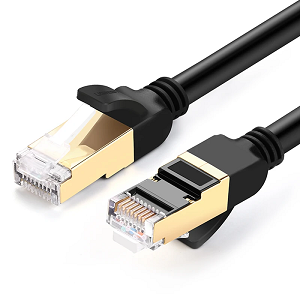
Figure 7. Cat7
Cat8
Cat8 is the newest and fastest Ethernet cable that works with RJ45 connectors. It can transfer data at speeds up to 40 gigabits per second, but only over short distances up to 30 meters (about 98 feet). This makes it perfect for data centers, where servers need to move a lot of data very quickly. Cat8 cables have very strong shielding to protect the signal from interference. They are thicker and heavier than other cables and cost more. Because of that, they are usually used in places that really need top speed and strong connections. If you want the fastest cable available today and don’t mind the higher cost, Cat8 is the best choice.
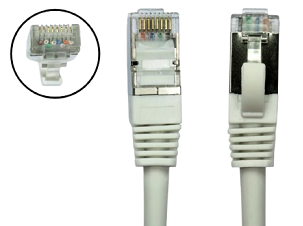
Figure 8. Cat8
Types of RJ45 Connectors
RJ45 connectors come in different forms to suit different uses:
Male Plugs
These are the connectors found at the end of Ethernet cables. They’re made of clear plastic and have eight small gold pins inside. The gold helps create a strong signal. Each male plug has a tiny tab that clicks into place when you plug it in. This tab keeps the cable from slipping out. You use male plugs to connect things like computers, modems, or Wi-Fi routers to a network. These are the most common type of RJ45 connector and are used in homes, schools, and offices.

Figure 9. Male RJ45 Connectors (RJ45 Plug)
Female Jacks
Female jacks are the parts that receive male plugs. You’ll find them on devices like routers, network switches, computers, or in wall sockets. They have springy metal contacts inside that touch the gold pins of the male plug. This makes the internet connection work. When you plug in the cable, it locks in place with a small click. Female jacks stay in one spot, and you just plug in when needed. They are used anywhere you connect a cable to a device.

Figure 10. Female RJ45 Connectors (RJ45 Socket)
Field-Installable Connectors
These connectors are made for tough places, like outdoors or in factories. They protect the cable from dust, dirt, and water. Some can be put together by hand without any special tools, which makes them easy to use. You can also take them apart and reuse them if needed. Use these when you have to fix or install cables in rough conditions. They are stronger than regular connectors and are great for fast, on-the-go work.

Figure 11. Field RJ45 Connectors
Keystone Jacks
Keystone jacks are used in walls or patch panels to keep things neat. They snap into wall plates or network boxes. The cable is connected inside using a special punch tool. After that, you can plug in a regular Ethernet cable on the outside. Keystone jacks are used in homes and offices to create clean, organized cable systems.
Straight-Through vs. Crossover Cables
Ethernet cables can be wired in two main ways: straight-through or crossover.
In a straight-through cable, the wires are connected the same way on both ends. Pin 1 goes to Pin 1, Pin 2 to Pin 2, and so on. This type of cable is used to connect different kinds of devices, like a computer to a router or a laptop to a switch. It’s the most common Ethernet cable used in homes and offices. If you’re just connecting your computer to the internet, this is the cable you usually use.

Figure 12. Straight-Through vs. Crossover Cables
In a crossover cable, some wires are swapped between the two ends. This lets two similar devices talk to each other directly, like computer to computer or switch to switch. One end usually uses T568A wiring, and the other uses T568B. This switch in wiring allows data to be sent and received correctly between the two devices.
Today, many new computers, routers, and switches have a smart feature called Auto-MDI/MDI-X. It lets the device figure out the cable type by itself. So, whether you use a straight-through or crossover cable, it will still work. But if you’re using older devices or trying to fix a connection problem, it’s still helpful to understand the difference between these two cable types.
Crimping an RJ45 Connector
To attach an RJ45 connector to a cable, follow a precise process:
1. Strip about an inch of the cable’s outer jacket.

Figure 13. Stripping the Cable Jacket
2. Untwist the four wire pairs and arrange them by color according to T568A or T568B.

Figure 14. Untwist and Smooth the Wire
3. Keep the twists as close to the connector as possible to reduce interference.
4. Trim the wires to the same length, about half an inch.
5. Slide them into the connector, ensuring each one reaches its pin and the sheath fits inside the rear of the plug.

Figure 15. Inserting the Wires into Plug
6. Use a crimping tool to press the connector’s metal contacts into the wires and lock the plug.

Figure 16. Crimping Tool
7. After crimping, test the cable using a network tester to ensure all wires are correctly connected and the signal is clean.

Figure 17. RJ45
Common RJ45 Wiring Mistakes
Some typical errors can cause big problems in network performance:
• Mixed wiring standards: Using T568A on one end and T568B on the other (when you shouldn’t) can cause the cable to act as a crossover instead of a straight-through.
• Bad crimps: Loose or poorly pressed contacts may cause unstable connections or complete failure.
• Too much untwisting: Exposing too much wire or removing too much sheath increases interference.
• Skipping testing: Without a tester, it’s hard to catch issues like miswires or open circuits.
• Exceeding length limits: Going beyond 100 meters can degrade the signal.
• No strain relief: Without boots or support, connectors can pull loose or get damaged.
• Tight bends: Over-bending the cable can harm its internal structure.
RJ45 vs. RJ11 Connectors

Figure 18. RJ45 vs. RJ11 Connectors
|
Feature |
RJ45
Connector |
RJ11
Connector |
|
Primary Use |
Ethernet and high-speed data networks |
Telephone lines and DSL connections |
|
Number of Contacts |
8 contacts |
2 to 4 contacts |
|
Maximum Speed |
Up to 40 Gbps (short-range setups) |
Typically under 24 Mbps |
|
Size |
Larger |
Smaller |
|
Compatibility |
Cannot accept RJ11 plugs |
Can physically fit into RJ45 ports (not safe) |
|
Port Usage Warning |
Use only for Ethernet connections |
May damage RJ45 ports if inserted |
|
Cable Types |
Cat5, Cat5e, Cat6, Cat6a, Cat7, Cat8 |
Phone cables (e.g., flat 2-wire or 4-wire) |
Applications of RJ45

Figure 19. Applications of RJ45
Computer Networks
RJ-45 connectors are used in most computer networks today. They connect computers, servers, switches, and other devices using Ethernet cables. These connectors help data move quickly and reliably between many devices in offices and data centers. Whether in small businesses or large companies, RJ-45 connectors are important for building strong and organized networks.
Internet Connection
RJ-45 connectors are often used to connect devices to the internet. You’ll find them on Ethernet cables that link modems, routers, or switches to computers, smart TVs, and game consoles. People often prefer these wired connections because they are faster and more stable than Wi-Fi, especially when high-speed internet is needed.
Phone and Communication Systems
In modern phone systems, RJ-45 connectors help connect phones that use the internet (VoIP phones). These phones send voice through the same Ethernet cables used in computer networks. This makes the setup easier and more flexible, especially in offices and call centers.
Audio and Video Signals
RJ-45 connectors are also used to send sound and video signals, especially in systems like HDBaseT or IP-based HDMI. This lets you send high-quality audio and video through normal Ethernet cables, which can go farther than HDMI cables. It's useful in places like home theaters, meeting rooms, and digital displays.
Security Cameras
RJ-45 connectors are used in security systems to connect IP cameras to recorders and monitors. With PoE (Power over Ethernet), one Ethernet cable can send both data and power to the camera. This makes it easier to install cameras, even in hard-to-reach spots. It’s common in homes, offices, and businesses.
Home Networks
At home, RJ-45 connectors link devices like computers, printers, and media servers. For those want fast and steady internet like for gaming, streaming, or working from home, RJ45 connections are better than Wi-Fi because they reduce lag and signal loss.
Industry and Factories
In factories and other industrial areas, stronger RJ-45 connectors are used to connect machines, sensors, and control systems. These connectors can handle tough conditions like shaking, water, and electrical noise. They help keep communication running smoothly in places where regular cables might fail.
Physical Dimensions of RJ45 Connectors

Figure 20. Physical Dimensions of RJ45 Connectors
|
Part |
Measurement |
Details |
|
Overall Length |
20.45 mm |
Full length of the plug |
|
Overall Width |
11.68 mm |
Widest part of the connector |
|
Overall Height |
7.75 mm |
From base to top, including locking tab |
|
Contact Pin Pitch |
1.00 mm |
Distance between each of the 8 pins |
|
Contact Area Width |
9.50 mm |
Width where the 8 pins are aligned |
|
Latch (Tab) Length |
14.8 mm |
Length of the locking tab |
|
Latch Height |
2.77 mm |
How far the tab sticks out from the body |
|
Body Depth (before cable) |
12.32 mm |
From front of plug to where cable starts |
|
Stack Height |
6.60 mm |
Vertical size from base to top (excluding latch) |
Conclusion
RJ45 connectors are a main part of wired internet and network systems. They use 8 metal pins to send and receive data and work with many types of Ethernet cables, from older ones like Cat5 to newer, faster ones like Cat8. These connectors are strong, easy to use, and work with many different devices. There are different types of RJ45 connectors made for homes, offices, and even outdoor or factory use. Knowing how to wire them correctly, crimp them properly, and avoid mistakes helps keep your network running smoothly. Whether you're setting up a home network or a big office system, RJ45 connectors are one of the most important tools to get the job done right.
About us
ALLELCO LIMITED
Read more
Quick inquiry
Please send an inquiry, we will respond immediately.
Frequently Asked Questions [FAQ]
1. What’s the max length for an RJ45 Ethernet cable?
The maximum recommended length is 100 meters (328 feet) to avoid signal loss.
2. Can I use an RJ45 splitter to connect two devices?
No. Passive splitters can cause signal issues. Use a network switch instead to connect multiple devices properly.
3. Do RJ45 connectors support Power over Ethernet (PoE)?
Yes. RJ45 connectors can deliver both data and power using PoE-compatible cables and devices.
4. Is there a difference between shielded and unshielded RJ45 cables?
Yes. Shielded cables (STP) reduce interference better and are ideal for noisy environments. Unshielded (UTP) is more common.
5. What’s the difference between Ethernet and RJ45?
Ethernet is the network standard; RJ45 is the connector used on Ethernet cables to link devices together.
What Is A Potentiometer?
on September 30th
DB9 Connector vs RS232 Protocol: Key Differences, How They Work Together and How to Choose?
on June 26th
Popular Posts
-

Complex Instruction Set Computers: How They Changed Computing?
on June 14th 148402
-

USB-C Pinout and Features
on June 14th 131612
-

Using Xilinx Unified Simulation Primitives: A Comprehensive Guide to FPGA Design and Simulation
on June 14th 111884
-

Power Supply Voltages in Electronics: Meaning of VCC, VDD, VEE, VSS, and GND
on June 14th 94454
-

RJ45 Connector Guide: Pinout, Wiring, Cable Types, and Uses
on January 1th 93985
-

The Ultimate Guide to Wire Color Codes in Modern Electrical Systems
The way our electrical systems use colors isn’t just for looks. Each wire color now indicates a specific function, making it easier to identify and handle electrical components correctly during ins...on January 1th 76891
-

Quality (Q) Factor: Equations and Applications
The quality factor, or 'Q', is important when checking how well inductors and resonators work in electronic systems that use radio frequencies (RF). 'Q' measures how well a circuit minimizes energy...on January 1th 74843
-

Purge Valve Guide: Function, Symptoms, Testing, and Replacement for Optimal Engine Performance
The purge valve is a key part of a car’s system that helps keep the air clean by managing fuel vapors before they can escape into the atmosphere. This not only helps the environment by reducing pol...on January 1th 68783
-
Understanding Capacitors and Their Symbols in Circuit Diagrams
Capacitors are small parts used in almost all electronic devices. They store and release electrical energy and are found in things like power supplies, radios, and circuits that help reduce noise. ...on June 14th 58528
-

A23 Battery Specifications and Compatibility
The A23 battery is a small, cylinder-shaped battery with high voltage. Also called 23A, 23AE, or MN21, it runs at 12 volts and much higher than AA or AAA batteries. Its special design make...on January 1th 58132
HOT Part Number
-
MAX3100CEE-T
Analog Devices Inc./Maxim Integrated
IC UART SPI/MICRWIRE COMP 16QSOP
BD9B100MUV-E2
Rohm Semiconductor
IC REG BUCK ADJ 1A 16VQFN
UPD70F3539AF5A9-PN7-Q-A
Renesas Electronics America Inc
IC MICROCONTROLLER
18081A621JAT2A
KYOCERA AVX
CAP CER 620PF 100V NP0 1808
FDN340P
onsemi
MOSFET P-CH 20V 2A SUPERSOT3
70231-101
Amphenol ICC (FCI)
CONN RCPT BLADE PWR 8POS EDGE MT
MPSW42RLRAG
onsemi
TRANS NPN 300V 0.5A TO92
MC7824BT
onsemi
IC REG LINEAR 24V 1A TO220AB
LT1815CS5#TRPBF
Analog Devices Inc.
IC OPAMP VFB 1 CIRCUIT TSOT23-5
DG411DYZ
Renesas Electronics America Inc
IC SWITCH SPST-NCX4 35OHM 16SOIC
VFT2060C-M3/4W
Vishay General Semiconductor - Diodes Division
DIODE SCHOTTKY 20A 60V ITO-220AB
TSX562AIYST
STMicroelectronics
IC CMOS 2 CIRCUIT 8MINISO
MR256D08BMA45
Everspin Technologies Inc.
IC RAM 256KBIT PARALLEL 48FBGA
VSC3312YYP-01
Microchip Technology
IC SWITCH 16X16 6.5GBPS 196FCBGA
XC68HC908GP20CFB
Motorola
TSG 8BIT20K FLASH
CSR8811A08-ICXR-R
Qualcomm
IC RF TXRX+MCU BLUETOOTH
HIN202ECBN
Intersil
IC TRANSCEIVER FULL 2/2 16SOIC
MPSW05
onsemi
TRANS NPN 60V 0.5A TO92 -
12065C102JAZ2A
KYOCERA AVX
CAP CER 1000PF 50V X7R 1206
1N4055R
Solid State Inc.
DIODE GEN PURP REV 900V 275A DO9
ASX342ATSC00XPED0-DP
onsemi
IMAGE SENSOR VGA 1/4 CIS SOC
0433.125NR
Littelfuse Inc.
FUSE BOARD MNT 125MA 125VAC/VDC
1SMA5941BT3G
onsemi
DIODE ZENER 47V 1.5W SMA
DCP010512BP-U/700
Texas Instruments
DC DC CONVERTER 12V 1W
1N2134A
Solid State Inc.
DIODE GEN PURP 350V 70A DO5
1-1734344-1
TE Connectivity AMP Connectors
CONN D-SUB HD RCPT 15P R/A SLDR
KSD1621STF
onsemi
TRANS NPN 25V 2A SOT89-3
BQ24161RGET
Texas Instruments
IC BATT CHG LI-ION 1CELL 24VQFN
BTA26-600BW
STMicroelectronics
TRIAC ALTERNISTOR 600V 25A TOP3
NCP1239DD65R2G
onsemi
IC OFFLINE SWITCH FLYBACK 7SOIC
BQ20Z90DBTR-V150
Texas Instruments
IC GAS GAUGE LI-ION 30TSSOP
PCMB104T-1R0MT
Susumu
FIXED IND 1UH 18A 3.3 MOHM SMD
CY29942AXCT
Infineon Technologies
IC CLK BUFFER 1:18 200MHZ 32TQFP
CC0402KRX7R9BB561
YAGEO
CAP CER 560PF 50V X7R 0402
STPS20M60SG-TR
STMicroelectronics
DIODE SCHOTTKY 60V 20A D2PAK
AT25010N-10SC-2.7
Microchip Technology
IC EEPROM 1KBIT SPI 3MHZ 8SOIC -
04023A1R0CAT4A
KYOCERA AVX
CAP CER 1PF 25V C0G/NP0 0402
ISL6327IRZ
Intersil
SWITCHING CONTROLLER, VOLTAGE-MO
LQW18AN75NG0ZD
Murata Electronics
FIXED IND
DFA100BA160
SanRex Corporation
DIODE MODULE 1600V 100A
BAR46AFILM
STMicroelectronics
DIODE ARRAY SCHOTTKY 100V SOT23
MAX825SEUK
Analog Devices Inc./Maxim Integrated
IC SUPERVISOR MPU
LTC3891IUDC#TRPBF
Analog Devices Inc.
IC REG CTRLR BUCK 20QFN
FODM8801AR2
onsemi
OPTOISO 3.75KV TRANS 4-MINI-FLAT
FJV1845FMTF
Fairchild Semiconductor
SMALL SIGNAL BIPOLAR TRANSISTOR,
KSZ8893FQLI-FX
Microchip Technology
IC SWITCH ETH 3PORT 128QFP
170M6340
Eaton - Bussmann Electrical Division
FUSE SQUARE 400A 1.3KVAC RECT
BCM20741A2KFB1G
Broadcom Limited
SINGLE-CHIP BLUETOOTH
GRM0335C1H9R3DA01D
Murata Electronics
CAP CER 9.3PF 50V C0G/NP0 0201
TNY175PN
Power Integrations
11.5 W (85-265 VAC) 15 W (230 VA
742700726
Würth Elektronik
FERRITE CORE 278 OHM SOLID 4MM
DM74S20N
onsemi
IC GATE NAND 2CH 4-INP 14DIP
P4SMA56CA-E3/61
Vishay General Semiconductor - Diodes Division
TVS DIODE 47.8VWM 77VC DO214AC
GRM1885C1HR80CA01D
Murata Electronics
CAP CER 0.8PF 50V C0G/NP0 0603